> ## Documentation Index
> Fetch the complete documentation index at: https://novu-c5de82d9-docs-homepage-redesign.mintlify.site/llms.txt
> Use this file to discover all available pages before exploring further.
# Custom Code Agent Setup Overview
> Configure a Novu custom code agent: dashboard settings, bridge, providers, and handler code for your agent brain.
Agents are currently in private beta. Please contact us at [support@novu.co](mailto:support@novu.co) to get access.
To process incoming messages, you must set up an agent in two places: the Novu dashboard (name, providers, bridge URL, status) and your bridge app (handlers, replies, and signals). The pages in this section cover both sides.
## What you configure
A conversational agent includes:
* **Agent name**: Display name shown in the dashboard and in some provider UIs (for example, Slack mentions).
* **Agent identifier**: Unique `agentId` used in code and API calls. Set at creation and cannot be changed later.
* **Agent description**: Short summary of what the agent does.
* **Agent status**: Active or inactive; controls whether the agent processes incoming events.
* **Connected providers**: Chat providers linked to the agent (Slack, Microsoft Teams, WhatsApp, email, and others).
* **Agent bridge URL**: HTTP endpoint where Novu delivers events to your application (`/api/novu` in scaffolded projects).
* **Agent logic (code)**: Handler implementations for events, replies, and signals in your bridge app.
## Agent conversation flow
A conversation starts when a user sends a message to your agent on a connected provider. Novu receives the event, loads or creates the conversation, calls your handler with full context, and delivers your reply back to the same thread. Every turn is persisted in Novu.
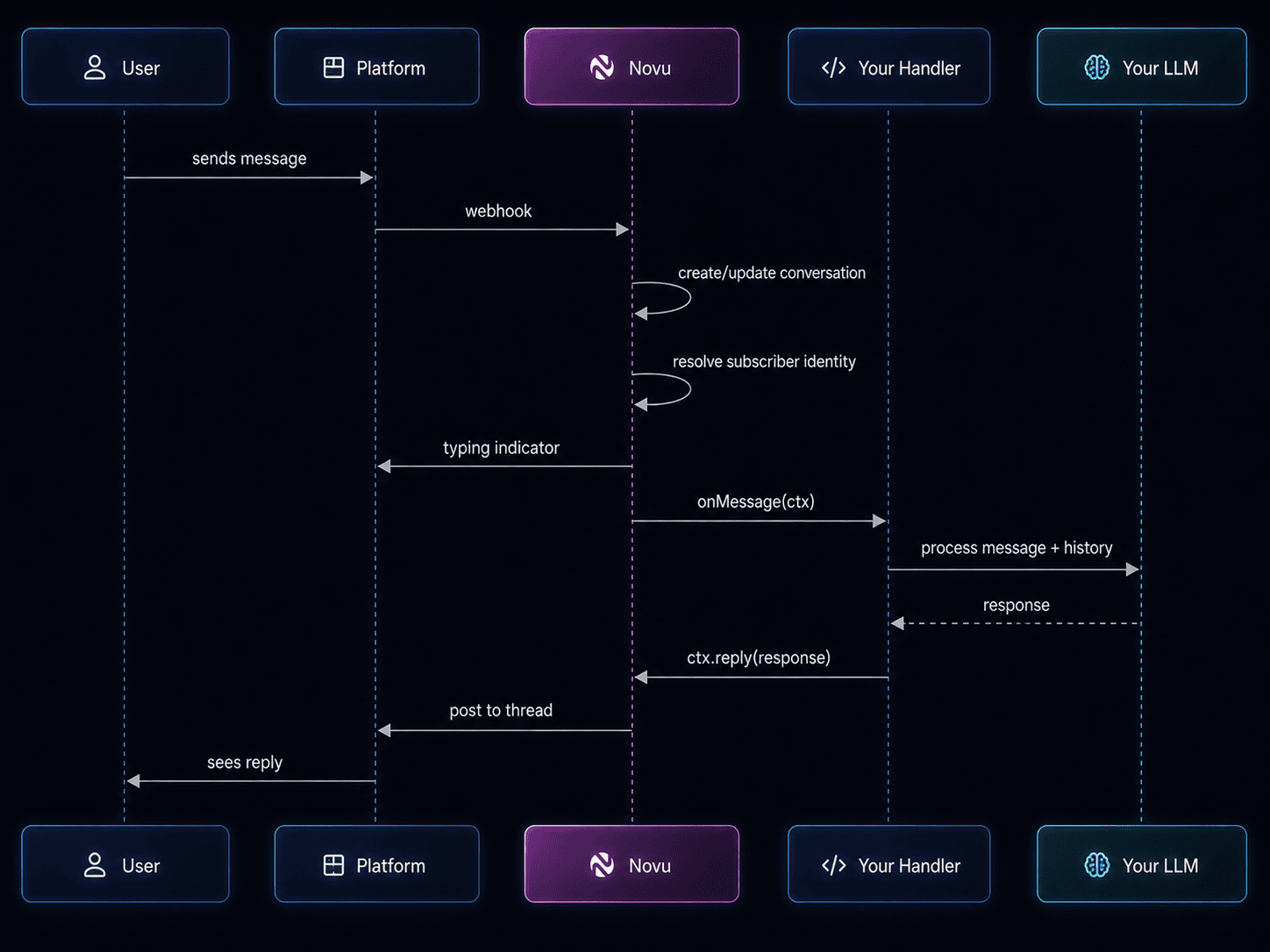 1. User sends a message on the provider (for example, Slack).
2. Novu normalizes the event and resolves the subscriber when possible.
3. Novu invokes the appropriate handler (`onMessage`, `onAction`, and so on) on your bridge URL.
4. Your handler returns a reply and/or emits signals (metadata, trigger, resolve).
5. Novu delivers the reply to the provider thread and records activity in the dashboard.
For step-by-step inbound processing, see [Mental model](/agents/get-started/mental-model).
## Where to go next
Create an agent in the Novu dashboard and connect a provider.
Generate a bridge application with the Novu CLI.
Build a support bot step by step.
View conversations and activity in the dashboard.
Run locally, deploy to development, and publish to production.
1. User sends a message on the provider (for example, Slack).
2. Novu normalizes the event and resolves the subscriber when possible.
3. Novu invokes the appropriate handler (`onMessage`, `onAction`, and so on) on your bridge URL.
4. Your handler returns a reply and/or emits signals (metadata, trigger, resolve).
5. Novu delivers the reply to the provider thread and records activity in the dashboard.
For step-by-step inbound processing, see [Mental model](/agents/get-started/mental-model).
## Where to go next
Create an agent in the Novu dashboard and connect a provider.
Generate a bridge application with the Novu CLI.
Build a support bot step by step.
View conversations and activity in the dashboard.
Run locally, deploy to development, and publish to production.