> ## Documentation Index
> Fetch the complete documentation index at: https://novu-c5de82d9-docs-homepage-redesign.mintlify.site/llms.txt
> Use this file to discover all available pages before exploring further.
# Signals
> Use signals in agent handlers for metadata, workflow triggers, and conversation resolution.
Signals let you change conversation state without sending another chat message. [Replies](/agents/custom-code-agent/setup-your-agent/reply) go to the user; signals update metadata, fire workflows, or mark a thread resolved.
Use `ctx.reply()` when the user should see something. Use signals when you only need to persist data, trigger a Novu workflow, or close the conversation.
## Signal types
| Signal | What it does | Method |
| -------- | ------------------------------------------------------------------- | ---------------------------------- |
| Metadata | Store key-value data on the conversation (persists across messages) | `ctx.metadata.set(key, value)` |
| Trigger | Fire a Novu workflow (email, push, SMS, multi-step) | `ctx.trigger(workflowId, options)` |
| Resolve | Mark the conversation as resolved, with an optional summary | `ctx.resolve(summary?)` |
You can combine both in one handler turn: reply to the user, set metadata, call `ctx.trigger()` for an escalation email, and `ctx.resolve()` when the issue is done.
## How signals are delivered
Signals are not sent the instant you call them. They are queued in memory and batched with your next `ctx.reply()` in a single HTTP request. That batches work into one request instead of several round trips.
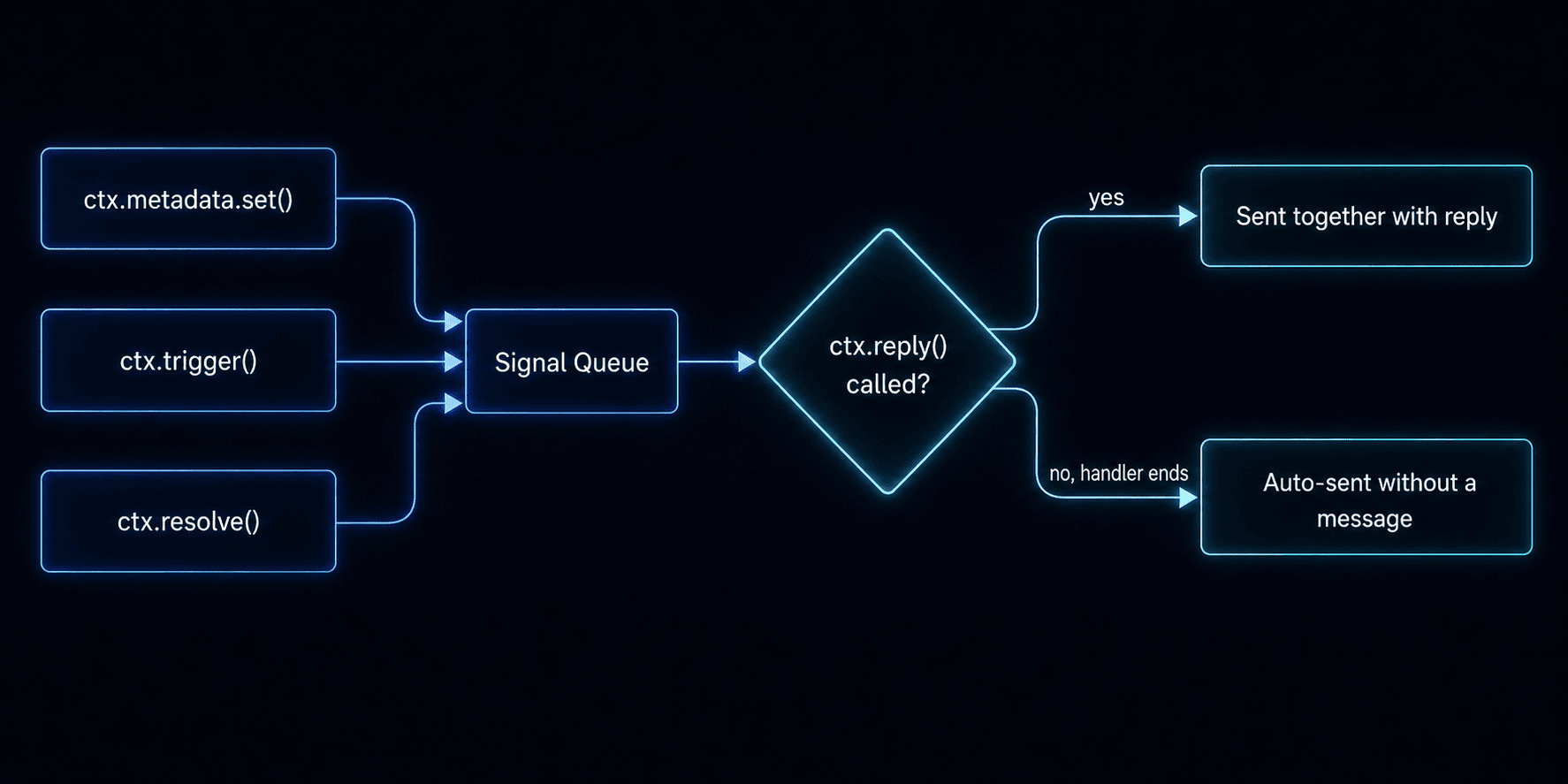 If your handler finishes without calling `ctx.reply()`, pending signals are still sent automatically.
## Set metadata
Store key-value data on the conversation (up to 64 KB cumulative). Metadata persists across messages and is available in `ctx.conversation.metadata` on every subsequent handler call.
```tsx theme={null}
ctx.metadata.set('sentiment', 'positive');
ctx.metadata.set('ticketId', 'JIRA-1234');
```
Use metadata for intent, ticket IDs, escalation flags, or any state your agent needs across turns.
## Trigger a workflow
Start any Novu workflow from a handler, the same workflows you use for email, push, or SMS elsewhere in your account.
```tsx theme={null}
ctx.trigger('escalation-email', {
to: ctx.subscriber?.subscriberId,
payload: { reason: 'User requested human support' },
});
```
Common patterns:
* Escalation emails
* CSAT surveys after resolution
* Alerting on-call teams
## Resolve a conversation
Mark the conversation as resolved with an optional summary. This sets status to `resolved`, fires `onResolve`, and stores the summary as signal activity.
```tsx theme={null}
ctx.resolve('Issue resolved - billing adjustment applied.');
```
Resolved conversations automatically reopen if the user sends a new message.
## Example: all three signals in one turn
```tsx theme={null}
import { agent } from '@novu/framework';
export const myAgent = agent('my-agent', {
onMessage: async ({ message, ctx }) => {
const response = await callLLM(message.text ?? '', ctx.history);
ctx.metadata.set('lastIntent', response.intent);
if (response.needsEscalation) {
ctx.trigger('escalation-workflow', {
to: ctx.subscriber?.subscriberId,
payload: { reason: response.reason },
});
}
if (response.done) {
ctx.resolve(response.summary);
}
await ctx.reply(response.text);
},
});
```
## Related
Send plain text, markdown, attachments, and interactive cards.
Event handlers and the context object your agent receives on every turn.
Walk through a full support-bot handler file.
If your handler finishes without calling `ctx.reply()`, pending signals are still sent automatically.
## Set metadata
Store key-value data on the conversation (up to 64 KB cumulative). Metadata persists across messages and is available in `ctx.conversation.metadata` on every subsequent handler call.
```tsx theme={null}
ctx.metadata.set('sentiment', 'positive');
ctx.metadata.set('ticketId', 'JIRA-1234');
```
Use metadata for intent, ticket IDs, escalation flags, or any state your agent needs across turns.
## Trigger a workflow
Start any Novu workflow from a handler, the same workflows you use for email, push, or SMS elsewhere in your account.
```tsx theme={null}
ctx.trigger('escalation-email', {
to: ctx.subscriber?.subscriberId,
payload: { reason: 'User requested human support' },
});
```
Common patterns:
* Escalation emails
* CSAT surveys after resolution
* Alerting on-call teams
## Resolve a conversation
Mark the conversation as resolved with an optional summary. This sets status to `resolved`, fires `onResolve`, and stores the summary as signal activity.
```tsx theme={null}
ctx.resolve('Issue resolved - billing adjustment applied.');
```
Resolved conversations automatically reopen if the user sends a new message.
## Example: all three signals in one turn
```tsx theme={null}
import { agent } from '@novu/framework';
export const myAgent = agent('my-agent', {
onMessage: async ({ message, ctx }) => {
const response = await callLLM(message.text ?? '', ctx.history);
ctx.metadata.set('lastIntent', response.intent);
if (response.needsEscalation) {
ctx.trigger('escalation-workflow', {
to: ctx.subscriber?.subscriberId,
payload: { reason: response.reason },
});
}
if (response.done) {
ctx.resolve(response.summary);
}
await ctx.reply(response.text);
},
});
```
## Related
Send plain text, markdown, attachments, and interactive cards.
Event handlers and the context object your agent receives on every turn.
Walk through a full support-bot handler file.