> ## Documentation Index
> Fetch the complete documentation index at: https://novu-c5de82d9-docs-homepage-redesign.mintlify.site/llms.txt
> Use this file to discover all available pages before exploring further.
# Notification event
> Learn about the Novu notifications lifecycle and the key entities that make up a notification.
In Novu, notifications are the core building blocks of your product’s communication experience. When your user receives a message via an in-app alert, an email, or a push notification, what they’re seeing is the final output of a notification.
Notifications represent the complete journey of a message triggered by an event in your application and delivered to a specific user across one or more channels. They encapsulate all the execution logic and delivery metadata in a single traceable unit.
## Notification lifecycle
A notification doesn't exist in isolation, it’s the result of a sequence of interconnected entities working together. Here’s how it works in Novu:
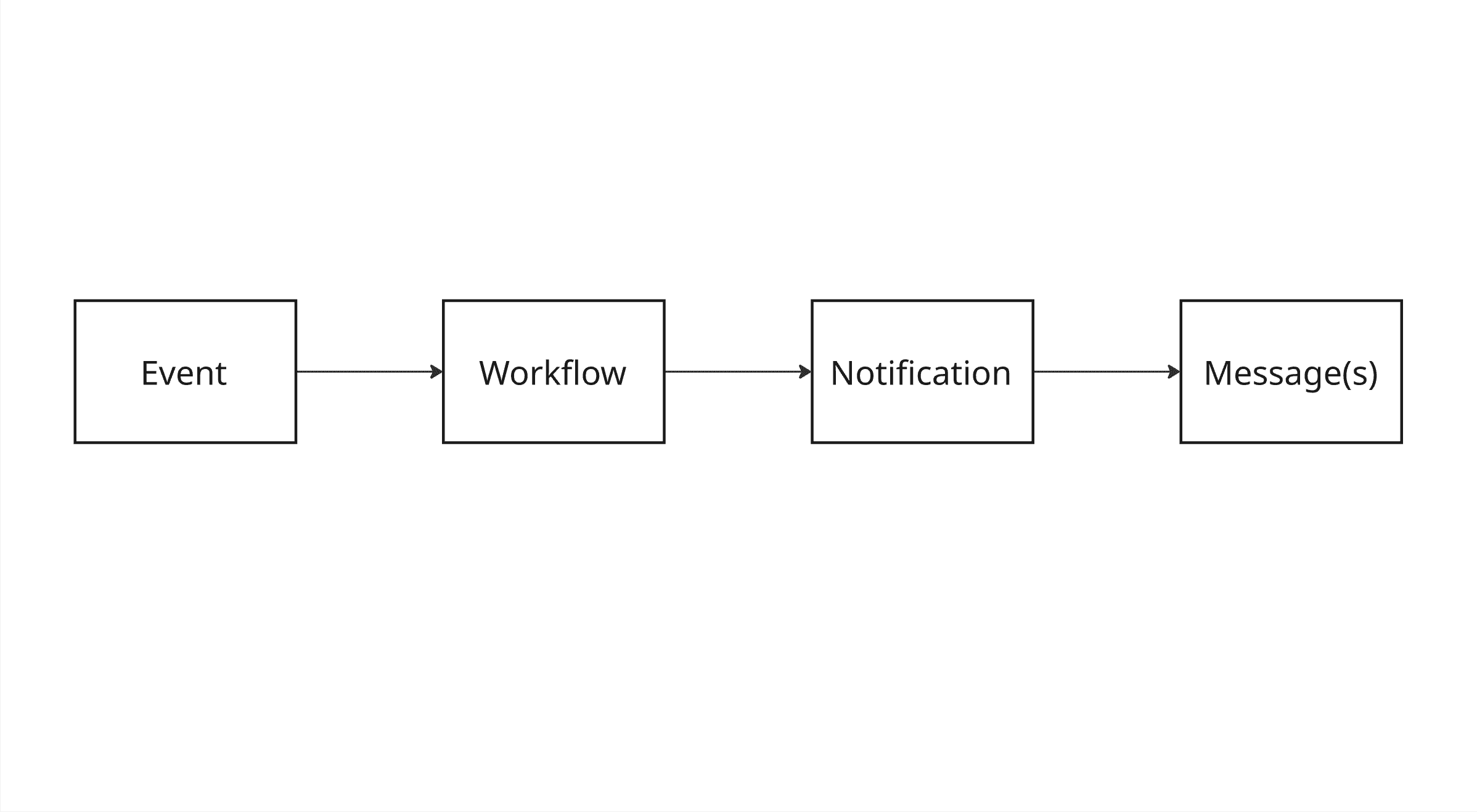 ### Event
Something meaningful happens in your application, such as a user signing up, a password reset being requested, or a comment being posted. You emit this event to Novu using the [Event Trigger API](/api-reference/events/trigger-event).
Each event contains:
* A name that maps to a specific workflow (user\_signed\_up)
* A payload with dynamic data
* One or more subscribers
* Optional overrides or metadata
This is how your application tells Novu, “It’s time to send something.”
### Workflow
Novu matches the incoming event to a predefined workflow. This workflow is your logic for determining:
* What channels to use (email, in-app, SMS, etc.)
* What message templates to render
* When and how messages should be sent
The workflow is where message personalization, conditional logic, and multi-channel orchestration happens.
Refer to the [Workflows documentation](/platform/concepts/workflows) to learn more.
### Notification
Once the workflow starts executing, Novu creates a notification for each subscriber involved. This notification acts as the central entity tracking everything that happens - every job, message, and delivery status. It includes:
* The subscriber details
* The workflow (template) used
* The event payload
* Jobs executed
* Messages generated
* Delivery status updates and errors
Think of it as the container for all activity triggered by a single event for a single user.
In simpler terms, when a workflow is triggered to a subscriber, it creates an event. One event is one notification.
### Message
Each channel step in the workflow results in one or more messages. These are the actual pieces of content sent to users' emails, push notifications, SMS, and in-app alerts.
Messages are live entities, tracked in real-time, with full visibility into:
* Rendering logic
* Channel used
* Delivery status
* Provider responses or errors
Each message has a unique ID and status, learn more about this in the [Messages API](/api-reference/messages/message-schema).
## Notification structure
A notification in Novu is more than just a message, it’s a full record of what happened from the moment an event was triggered to when one or more messages were delivered or failed to deliver.
Each notification encapsulates a set of properties that describe its creation, context, execution, and result. These properties are essential for debugging, analytics, and tracking user communications.
### Notification properties
| Property | Description |
| --------------- | --------------------------------------------------------------------------------------------------------------------------------------------------- |
| `transactionId` | A unique identifier for this specific notification execution run. Useful for tracing across APIs and logs. |
| `template` | The workflow (template) that was executed. Defines the steps and channels used. |
| `subscriber` | The user who received the notification. Includes subscriber ID and metadata. |
| `payload` | Dynamic data passed in from the event, used to render personalized message content. |
| `jobs` | A list of steps (jobs) that were executed as part of the workflow. Each job corresponds to a workflow action, for example, send email or run delay. |
| `messages` | The individual messages generated for each channel. Contains delivery status, content, and provider response. |
| `status` | The current execution state of the notification (`pending`, `completed`, `failed`, and so on). |
These fields are accessible via the [Notifications API](/api-reference/notifications/list-all-events) and are also displayed in the Novu dashboard’s [Activity Feed](https://dashboard.novu.co/activity-feed) for visual traceability.
## Frequently asked questions
These are some of the most frequently asked questions about notifications in Novu.
A notification is the result of an event. An event is the trigger of a workflow to a subscriber that causes a notification to be created.
One notification event can have multiple messages as per the workflow configuration. Messages are the actual "notification message" to the end user.
### Event
Something meaningful happens in your application, such as a user signing up, a password reset being requested, or a comment being posted. You emit this event to Novu using the [Event Trigger API](/api-reference/events/trigger-event).
Each event contains:
* A name that maps to a specific workflow (user\_signed\_up)
* A payload with dynamic data
* One or more subscribers
* Optional overrides or metadata
This is how your application tells Novu, “It’s time to send something.”
### Workflow
Novu matches the incoming event to a predefined workflow. This workflow is your logic for determining:
* What channels to use (email, in-app, SMS, etc.)
* What message templates to render
* When and how messages should be sent
The workflow is where message personalization, conditional logic, and multi-channel orchestration happens.
Refer to the [Workflows documentation](/platform/concepts/workflows) to learn more.
### Notification
Once the workflow starts executing, Novu creates a notification for each subscriber involved. This notification acts as the central entity tracking everything that happens - every job, message, and delivery status. It includes:
* The subscriber details
* The workflow (template) used
* The event payload
* Jobs executed
* Messages generated
* Delivery status updates and errors
Think of it as the container for all activity triggered by a single event for a single user.
In simpler terms, when a workflow is triggered to a subscriber, it creates an event. One event is one notification.
### Message
Each channel step in the workflow results in one or more messages. These are the actual pieces of content sent to users' emails, push notifications, SMS, and in-app alerts.
Messages are live entities, tracked in real-time, with full visibility into:
* Rendering logic
* Channel used
* Delivery status
* Provider responses or errors
Each message has a unique ID and status, learn more about this in the [Messages API](/api-reference/messages/message-schema).
## Notification structure
A notification in Novu is more than just a message, it’s a full record of what happened from the moment an event was triggered to when one or more messages were delivered or failed to deliver.
Each notification encapsulates a set of properties that describe its creation, context, execution, and result. These properties are essential for debugging, analytics, and tracking user communications.
### Notification properties
| Property | Description |
| --------------- | --------------------------------------------------------------------------------------------------------------------------------------------------- |
| `transactionId` | A unique identifier for this specific notification execution run. Useful for tracing across APIs and logs. |
| `template` | The workflow (template) that was executed. Defines the steps and channels used. |
| `subscriber` | The user who received the notification. Includes subscriber ID and metadata. |
| `payload` | Dynamic data passed in from the event, used to render personalized message content. |
| `jobs` | A list of steps (jobs) that were executed as part of the workflow. Each job corresponds to a workflow action, for example, send email or run delay. |
| `messages` | The individual messages generated for each channel. Contains delivery status, content, and provider response. |
| `status` | The current execution state of the notification (`pending`, `completed`, `failed`, and so on). |
These fields are accessible via the [Notifications API](/api-reference/notifications/list-all-events) and are also displayed in the Novu dashboard’s [Activity Feed](https://dashboard.novu.co/activity-feed) for visual traceability.
## Frequently asked questions
These are some of the most frequently asked questions about notifications in Novu.
A notification is the result of an event. An event is the trigger of a workflow to a subscriber that causes a notification to be created.
One notification event can have multiple messages as per the workflow configuration. Messages are the actual "notification message" to the end user.