> ## Documentation Index
> Fetch the complete documentation index at: https://novu-c5de82d9-docs-homepage-redesign.mintlify.site/llms.txt
> Use this file to discover all available pages before exploring further.
# How Novu Works — Architecture and Notification Flow
> A high-level overview of Novu’s architecture: workflows, triggers, subscribers, and environments, and how they connect to support in-app and external channels.
Novu triggers workflows that deliver notifications to subscribers across in-app, email, SMS, push, and chat channels. Your application sends an event to the Novu API, Novu resolves the subscriber and executes each workflow step, then delivers messages through configured integrations or the [``](/platform/inbox) component.
## How does the Inbox component fit in the notification lifecycle?
The [``](/platform/inbox) component is Novu’s in-app delivery endpoint. This component makes it possible for users to receive and manage notifications directly within your application interface.
Unlike external channels that rely on third-party providers, the Inbox is internal to your app. It uses the environment’s `application identifier` to establish a secure connection, scoped to your subscribers.
When a workflow includes an in-app step, messages are routed to the subscriber’s inbox in real time. The Inbox component handles rendering, notification management, users' preferences, and message actions without requiring additional backend logic.
## What are the core concepts in Novu?
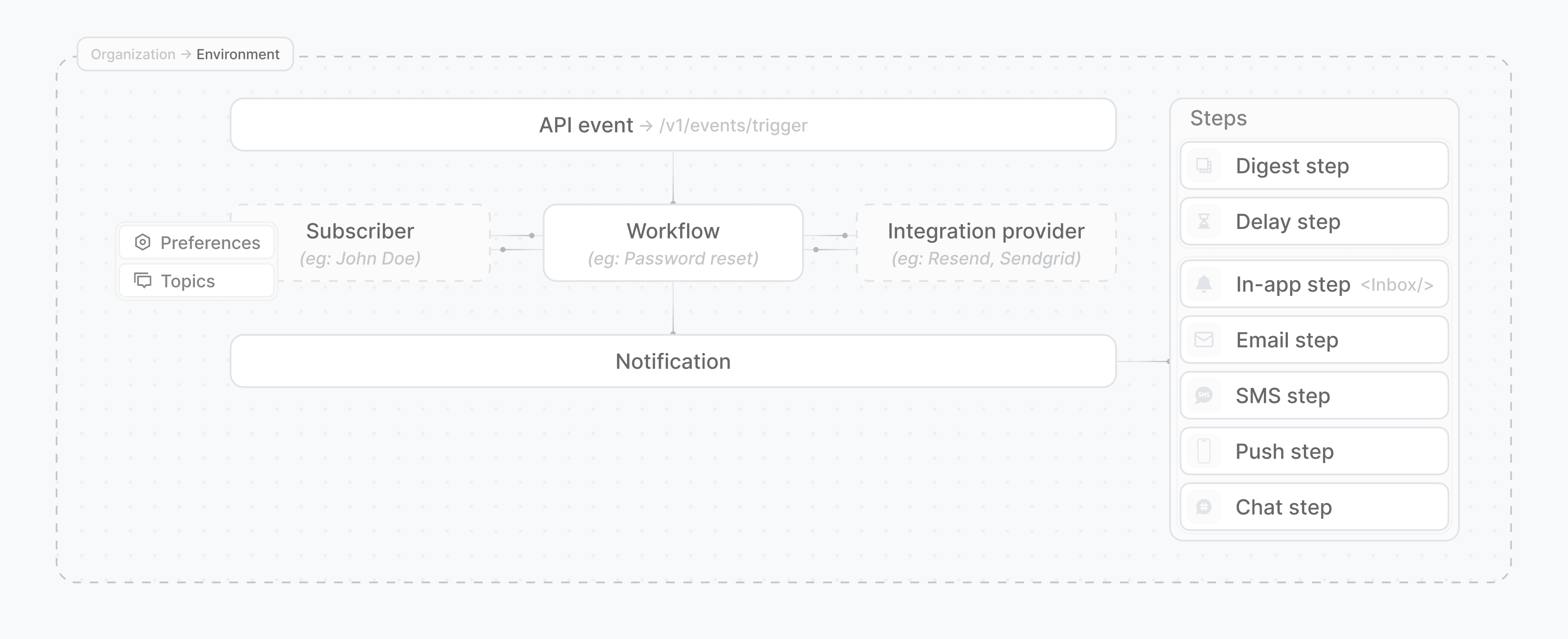
At a high level, Novu’s architecture is built around modular but connected concepts. Each concept serves a specific role in the delivery pipeline and is scoped to an environment.
 ### How do organizations and environments work?
Everything starts with your organization, the top-level entity in Novu. Each organization can have multiple environments, such as:
* Development for testing
* Production for live apps
* Any custom environments you need (for example, Staging)
Each environment contains:
* Independent workflows
* Environment-specific subscribers
* Topics
* Separate integrations and credentials
* API keys for secure access (application identifier, secret keys)
This isolation allows teams to test workflows and notifications on one environment without affecting the other environments.
### How do workflows and triggers work?
A workflow defines the steps Novu takes to deliver a notification. Steps are either channel steps (email, in-app, push, chat, and SMS) or action steps (Delay and Digest).
Workflows are environment-specific and versioned. You trigger them using the REST API by sending an event along with the relevant secret key from the current environment, `subscriberId`, `workflowId`, and `payload`.
Each trigger becomes an event that flows through the workflow. Steps in the workflow generate messages, which are delivered via their corresponding channels or routed to the inbox.
To learn more about workflows, refer to the [Workflows documentation](/platform/concepts/workflows).
### How do subscribers and topics work?
A subscriber represents a user in a given environment. Each subscriber has:
* **Channel identifiers**: Such as email address or phone number.
* **A unique `subscriberId`**: Used when triggering workflows and resolving the recipient.
* **Personal details**: You can pass `firstName` and `lastName` when creating the subscriber.
* **Custom metadata**: Stored under a `data` field, which is a flexible JSON object where you can store any additional user-specific information (for example, plan level, preferences, timestamps).
* **Environment-specific preferences**: Like preferred channels and opt-in settings.
To send notifications to multiple users, you can group subscribers into a topic. A workflow can be triggered for an individual subscriber or for all subscribers within a topic.
Subscriber resolution is part of workflow execution. Novu uses the subscriber's metadata to determine how messages are personalized, delivered, and stored.
To learn more about subscribers, refer to the [Subscribers documentation](/platform/concepts/subscribers).
### How do channels and the Inbox component work?
Each channel represents a delivery medium (email, SMS, push, chat, or in-app). Channels are linked to provider configurations known as integrations, which are defined per environment.
In-app messages are delivered to the [``](/platform/inbox) component, which is located in your frontend and listens for messages scoped to the current environment and subscriber.
To learn more about channels and the Inbox component, refer to the [Channels documentation](/platform/integrations)
### How do integrations work?
Integrations connect Novu to external delivery providers (for example, SendGrid, Twilio, Firebase Cloud Messaging, Slack). They are configured per environment and mapped to specific channels.
During workflow execution, Novu uses these integrations to send messages for steps that require external delivery. The presence of an integration for a given channel is required for a workflow step to succeed.
To learn more about Integrations, refer to the [Integrations documentation](/platform/concepts/integrations).
## How does the full notification flow work?
See how the concepts work together:
Your application calls Novu’s API and passes in:
* The secret API key for your environment.
* The `workflowIdentifier` of the workflow that you want to run.
* The `subscriberId` of the user that you want to notify (or a topic key for bulk notifications).
* An optional `payload` to customize message content for example, `{{firstName}}`, `{{orderId}}`
Novu looks up the subscriber using the ID you provided. This includes:
* Channel-specific identifiers (email and phone number).
* Subscriber preferences, which might affect delivery behavior.
* Any metadata tied to that subscriber in the current environment
Each step is evaluated in order. These steps include:
* **Channel steps**: Deliver a message via email, SMS, push, in-app, or chat.
* **Action steps**: Introduce logic such as delays or digest aggregation.
If a step fails (for example, due to a provider error), then Novu retries it without re-executing previous steps. This ensures fault tolerance and message-level traceability.
Once a step completes, Novu uses the environment’s configured integrations to deliver the message. For example:
* An Email step uses a provider like SendGrid.
* An In-App step sends the message to the [``](/platform/inbox) component in your frontend.
* An SMS step uses a provider like Twilio.
Each triggered workflow becomes an event with a unique `transactionId`. Novu records:
* Which steps ran.
* Whether each step succeeded or failed.
* How long each step took.
* What messages were generated and sent.
The Novu pipeline is designed to be consistent, observable, and scalable across channels and environments.
### How do organizations and environments work?
Everything starts with your organization, the top-level entity in Novu. Each organization can have multiple environments, such as:
* Development for testing
* Production for live apps
* Any custom environments you need (for example, Staging)
Each environment contains:
* Independent workflows
* Environment-specific subscribers
* Topics
* Separate integrations and credentials
* API keys for secure access (application identifier, secret keys)
This isolation allows teams to test workflows and notifications on one environment without affecting the other environments.
### How do workflows and triggers work?
A workflow defines the steps Novu takes to deliver a notification. Steps are either channel steps (email, in-app, push, chat, and SMS) or action steps (Delay and Digest).
Workflows are environment-specific and versioned. You trigger them using the REST API by sending an event along with the relevant secret key from the current environment, `subscriberId`, `workflowId`, and `payload`.
Each trigger becomes an event that flows through the workflow. Steps in the workflow generate messages, which are delivered via their corresponding channels or routed to the inbox.
To learn more about workflows, refer to the [Workflows documentation](/platform/concepts/workflows).
### How do subscribers and topics work?
A subscriber represents a user in a given environment. Each subscriber has:
* **Channel identifiers**: Such as email address or phone number.
* **A unique `subscriberId`**: Used when triggering workflows and resolving the recipient.
* **Personal details**: You can pass `firstName` and `lastName` when creating the subscriber.
* **Custom metadata**: Stored under a `data` field, which is a flexible JSON object where you can store any additional user-specific information (for example, plan level, preferences, timestamps).
* **Environment-specific preferences**: Like preferred channels and opt-in settings.
To send notifications to multiple users, you can group subscribers into a topic. A workflow can be triggered for an individual subscriber or for all subscribers within a topic.
Subscriber resolution is part of workflow execution. Novu uses the subscriber's metadata to determine how messages are personalized, delivered, and stored.
To learn more about subscribers, refer to the [Subscribers documentation](/platform/concepts/subscribers).
### How do channels and the Inbox component work?
Each channel represents a delivery medium (email, SMS, push, chat, or in-app). Channels are linked to provider configurations known as integrations, which are defined per environment.
In-app messages are delivered to the [``](/platform/inbox) component, which is located in your frontend and listens for messages scoped to the current environment and subscriber.
To learn more about channels and the Inbox component, refer to the [Channels documentation](/platform/integrations)
### How do integrations work?
Integrations connect Novu to external delivery providers (for example, SendGrid, Twilio, Firebase Cloud Messaging, Slack). They are configured per environment and mapped to specific channels.
During workflow execution, Novu uses these integrations to send messages for steps that require external delivery. The presence of an integration for a given channel is required for a workflow step to succeed.
To learn more about Integrations, refer to the [Integrations documentation](/platform/concepts/integrations).
## How does the full notification flow work?
See how the concepts work together:
Your application calls Novu’s API and passes in:
* The secret API key for your environment.
* The `workflowIdentifier` of the workflow that you want to run.
* The `subscriberId` of the user that you want to notify (or a topic key for bulk notifications).
* An optional `payload` to customize message content for example, `{{firstName}}`, `{{orderId}}`
Novu looks up the subscriber using the ID you provided. This includes:
* Channel-specific identifiers (email and phone number).
* Subscriber preferences, which might affect delivery behavior.
* Any metadata tied to that subscriber in the current environment
Each step is evaluated in order. These steps include:
* **Channel steps**: Deliver a message via email, SMS, push, in-app, or chat.
* **Action steps**: Introduce logic such as delays or digest aggregation.
If a step fails (for example, due to a provider error), then Novu retries it without re-executing previous steps. This ensures fault tolerance and message-level traceability.
Once a step completes, Novu uses the environment’s configured integrations to deliver the message. For example:
* An Email step uses a provider like SendGrid.
* An In-App step sends the message to the [``](/platform/inbox) component in your frontend.
* An SMS step uses a provider like Twilio.
Each triggered workflow becomes an event with a unique `transactionId`. Novu records:
* Which steps ran.
* Whether each step succeeded or failed.
* How long each step took.
* What messages were generated and sent.
The Novu pipeline is designed to be consistent, observable, and scalable across channels and environments.