> ## Documentation Index
> Fetch the complete documentation index at: https://novu-c5de82d9-docs-homepage-redesign.mintlify.site/llms.txt
> Use this file to discover all available pages before exploring further.
# Prepare for Production
> Learn how to prepare your Inbox for production by enabling HMAC encryption for security and managing Novu's branding.
Before deploying the Inbox UI to production, you should secure your integration and configure the correct environment. You can also remove Novu's branding from your notifications.
This ensures that your end users receive notifications safely, without exposure to unnecessary risks, and in a way that aligns with your product branding.
## Set the correct environment
Novu supports multiple environments, including development, production, and any custom environments you create.
When preparing for deployment, choose the environment that will serve as your production environment and update your configuration accordingly:
* Use the API keys for your selected production environment from the [API Keys](https://dashboard.novu.co/api-keys) page in your application.
* Store keys in `.env` file or your server’s environment variables.
* Confirm your `applicationIdentifier` and `subscriber` match the configuration for your chosen production environment.
* Add these two props, if using the EU region:
* `apiUrl` with value **[https://eu.api.novu.co](https://eu.api.novu.co)**
* `socketUrl` with value **wss\://eu.socket.novu.co**
## Secure your Inbox with HMAC encryption
When you add the Inbox to your application, you're required to pass:
* `subscriberId`: Identifies the current subscriber.
* `applicationIdentifier`: A public key to communicate with the notification feed API.
Without additional security, a malicious actor could potentially guess another subscriber's `subscriberId` and use your public `applicationIdentifier` to view that user's notifications.
You can prevent this by enabling HMAC (Hash-based Message Authentication Code) encryption. This process uses a *secret key* to create a secure signature (`subscriberHash`) for each `subscriberId`. Novu then verifies this hash to ensure that requests to view a notification feed are authentic and not from an impersonator.
Follow these steps to enable HMAC encryption.
### 1. Enable HMAC in the dashboard
Activate the HMAC security feature within your Novu in-app provider settings.
1. Go to [Novu Dashboard](https://dashboard.novu.co).
2. Navigate to the [Integrations Store](https://dashboard.novu.co/integrations) page.
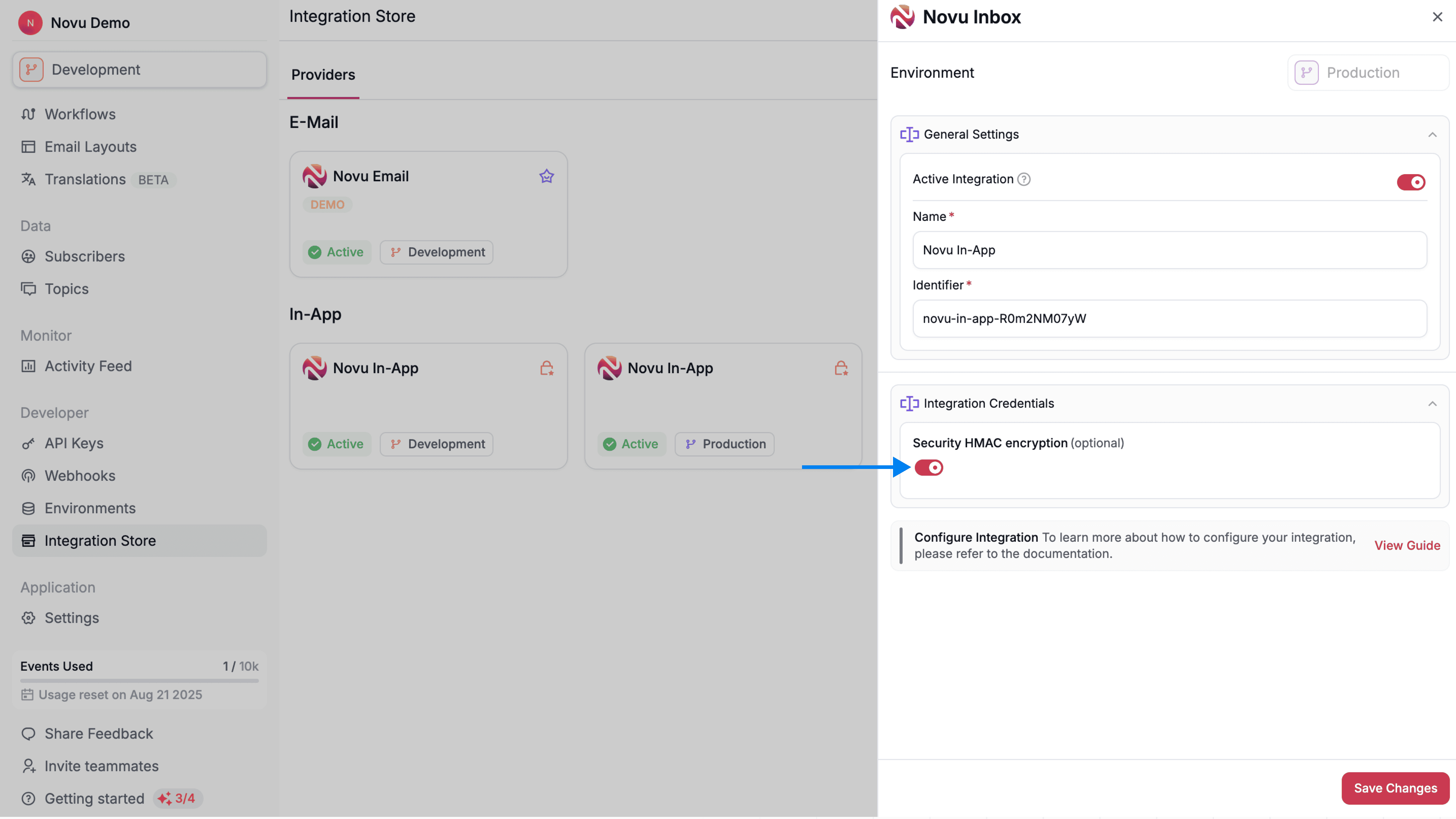
3. Click on the **Novu In-App** for your chosen production environment
4. A side panel opens from the right side of the screen with the provider settings, enable `Security HMAC encryption` toggle in **Integration Credentials** section.
 ### 2. Generate HMAC hash on the server side
Next, use your secret key from the [API Keys](https://dashboard.novu.co/api-keys) page on the Novu dashboard to generate an HMAC-SHA256 hash of the `subscriberId` on the server side.
The hash is computed as `HMAC-SHA256(secretKey, subscriberId)` and returned as a lowercase hex string.
```typescript title="utils/hmac-hash.ts" theme={null}
import { createHmac } from 'crypto';
// The subscriberId of the logged-in user
const subscriberId = 'REPLACE_WITH_SUBSCRIBER_ID';
// The secret key from your Novu API Keys page
const novuSecretKey = process.env.NOVU_SECRET_KEY;
// Generate the HMAC hash
const subscriberHash = createHmac('sha256', novuSecretKey)
.update(subscriberId)
.digest('hex');
```
```python title="utils/hmac_hash.py" theme={null}
import hashlib
import hmac
import os
# The subscriberId of the logged-in user
subscriber_id = 'REPLACE_WITH_SUBSCRIBER_ID'
# The secret key from your Novu API Keys page
novu_secret_key = os.environ['NOVU_SECRET_KEY']
# Generate the HMAC hash
subscriber_hash = hmac.new(
novu_secret_key.encode('utf-8'),
subscriber_id.encode('utf-8'),
hashlib.sha256
).hexdigest()
```
```go title="utils/hmac_hash.go" theme={null}
import (
"crypto/hmac"
"crypto/sha256"
"encoding/hex"
"os"
)
// The subscriberId of the logged-in user
subscriberID := "REPLACE_WITH_SUBSCRIBER_ID"
// The secret key from your Novu API Keys page
novuSecretKey := os.Getenv("NOVU_SECRET_KEY")
mac := hmac.New(sha256.New, []byte(novuSecretKey))
mac.Write([]byte(subscriberID))
subscriberHash := hex.EncodeToString(mac.Sum(nil))
```
```php title="utils/hmac-hash.php" theme={null}
```ruby title="utils/hmac_hash.rb" theme={null}
require 'openssl'
# The subscriberId of the logged-in user
subscriber_id = 'REPLACE_WITH_SUBSCRIBER_ID'
# The secret key from your Novu API Keys page
novu_secret_key = ENV['NOVU_SECRET_KEY']
# Generate the HMAC hash
subscriber_hash = OpenSSL::HMAC.hexdigest('SHA256', novu_secret_key, subscriber_id)
```
```java title="utils/HmacHash.java" theme={null}
import javax.crypto.Mac;
import javax.crypto.spec.SecretKeySpec;
import java.math.BigInteger;
import java.nio.charset.StandardCharsets;
public class HmacHash {
public static String getSubscriberHash(String subscriberId, String novuSecretKey) throws Exception {
Mac mac = Mac.getInstance("HmacSHA256");
mac.init(new SecretKeySpec(novuSecretKey.getBytes(StandardCharsets.UTF_8), "HmacSHA256"));
byte[] hash = mac.doFinal(subscriberId.getBytes(StandardCharsets.UTF_8));
return String.format("%064x", new BigInteger(1, hash));
}
}
```
```csharp title="Utils/HmacHash.cs" theme={null}
using System.Security.Cryptography;
using System.Text;
// The subscriberId of the logged-in user
string subscriberId = "REPLACE_WITH_SUBSCRIBER_ID";
// The secret key from your Novu API Keys page
string novuSecretKey = Environment.GetEnvironmentVariable("NOVU_SECRET_KEY");
using var hmac = new HMACSHA256(Encoding.UTF8.GetBytes(novuSecretKey));
byte[] hash = hmac.ComputeHash(Encoding.UTF8.GetBytes(subscriberId));
string subscriberHash = BitConverter.ToString(hash).Replace("-", "").ToLower();
```
#### With context
If you use [Inbox with context](/platform/inbox/configuration/inbox-with-context), also generate a hash for the context object. Context must be serialized as canonical JSON ([RFC-8259](https://datatracker.ietf.org/doc/html/rfc8259)) so key order and whitespace do not affect the hash.
```tsx title="utils/hmac-hash.ts" theme={null}
import { createHmac } from 'crypto';
import { canonicalize } from '@tufjs/canonical-json';
// The subscriberId of the logged-in user
const subscriberId = 'REPLACE_WITH_SUBSCRIBER_ID';
// The secret key from your Novu API Keys page
const novuSecretKey = process.env.NOVU_SECRET_KEY;
// Generate the subscriber hash
const subscriberHash = createHmac('sha256', novuSecretKey)
.update(subscriberId)
.digest('hex');
const context = {
tenant: {
id: "acme-corp",
data: {
name: "Acme Corporation",
plan: "enterprise",
},
},
};
// Generate the context hash
const contextHash = createHmac('sha256', novuSecretKey)
.update(canonicalize(context))
.digest('hex');
```
Keep `NOVU_SECRET_KEY` secure and never expose it to the client.
### 3. Use the HMAC hash in the Inbox component
Send the `hmacHash` generated in the previous step to the client side application. You can include it in the initial data payload when a subscriber or user logs in or fetch it from a dedicated API endpoint.
Pass the hash to the `subscriberHash` prop in your Inbox component.
```tsx title="components/InboxWithSubscriberHash.tsx" theme={null}
import { Inbox } from '@novu/react';
// Example: The hmacHash is passed to the frontend
// as part of the user object after they authenticate.
const { user } = currentUser();
const hmacHash = user?.novuSubscriberHash;
;
```
```tsx title="components/InboxWithSubscriberAndContextHashes.tsx" theme={null}
import { Inbox } from '@novu/react';
const { user } = currentUser();
const subscriberHash = user?.novuSubscriberHash;
const contextHash = user?.novuContextHash;
const context = {
tenant: {
id: "acme-corp",
data: {
name: "Acme Corporation",
plan: "enterprise",
},
},
};
```
If HMAC encryption is active in In-App provider settings and `subscriberHash` along with
`subscriberId` is not provided, then Inbox will not load
## Remove Novu branding
Users on a paid plan can remove the Novu branding from the Inbox UI and Emails.
Novu branding appears on Inbox UI, emails and [agents](/agents) messages. It does not change the content of SMS, push, or chat messages.
To remove the branding:
1. Go to the [Novu Dashboard](https://dashboard.novu.co) and open the [Settings page](https://dashboard.novu.co/settings) directly, or click your organization name in the top-left of the sidebar to open it.
2. Under the **Organization** tab, find the **Branding & Integrations** section.
3. Enable the **Remove Novu branding** toggle.
### 2. Generate HMAC hash on the server side
Next, use your secret key from the [API Keys](https://dashboard.novu.co/api-keys) page on the Novu dashboard to generate an HMAC-SHA256 hash of the `subscriberId` on the server side.
The hash is computed as `HMAC-SHA256(secretKey, subscriberId)` and returned as a lowercase hex string.
```typescript title="utils/hmac-hash.ts" theme={null}
import { createHmac } from 'crypto';
// The subscriberId of the logged-in user
const subscriberId = 'REPLACE_WITH_SUBSCRIBER_ID';
// The secret key from your Novu API Keys page
const novuSecretKey = process.env.NOVU_SECRET_KEY;
// Generate the HMAC hash
const subscriberHash = createHmac('sha256', novuSecretKey)
.update(subscriberId)
.digest('hex');
```
```python title="utils/hmac_hash.py" theme={null}
import hashlib
import hmac
import os
# The subscriberId of the logged-in user
subscriber_id = 'REPLACE_WITH_SUBSCRIBER_ID'
# The secret key from your Novu API Keys page
novu_secret_key = os.environ['NOVU_SECRET_KEY']
# Generate the HMAC hash
subscriber_hash = hmac.new(
novu_secret_key.encode('utf-8'),
subscriber_id.encode('utf-8'),
hashlib.sha256
).hexdigest()
```
```go title="utils/hmac_hash.go" theme={null}
import (
"crypto/hmac"
"crypto/sha256"
"encoding/hex"
"os"
)
// The subscriberId of the logged-in user
subscriberID := "REPLACE_WITH_SUBSCRIBER_ID"
// The secret key from your Novu API Keys page
novuSecretKey := os.Getenv("NOVU_SECRET_KEY")
mac := hmac.New(sha256.New, []byte(novuSecretKey))
mac.Write([]byte(subscriberID))
subscriberHash := hex.EncodeToString(mac.Sum(nil))
```
```php title="utils/hmac-hash.php" theme={null}
```ruby title="utils/hmac_hash.rb" theme={null}
require 'openssl'
# The subscriberId of the logged-in user
subscriber_id = 'REPLACE_WITH_SUBSCRIBER_ID'
# The secret key from your Novu API Keys page
novu_secret_key = ENV['NOVU_SECRET_KEY']
# Generate the HMAC hash
subscriber_hash = OpenSSL::HMAC.hexdigest('SHA256', novu_secret_key, subscriber_id)
```
```java title="utils/HmacHash.java" theme={null}
import javax.crypto.Mac;
import javax.crypto.spec.SecretKeySpec;
import java.math.BigInteger;
import java.nio.charset.StandardCharsets;
public class HmacHash {
public static String getSubscriberHash(String subscriberId, String novuSecretKey) throws Exception {
Mac mac = Mac.getInstance("HmacSHA256");
mac.init(new SecretKeySpec(novuSecretKey.getBytes(StandardCharsets.UTF_8), "HmacSHA256"));
byte[] hash = mac.doFinal(subscriberId.getBytes(StandardCharsets.UTF_8));
return String.format("%064x", new BigInteger(1, hash));
}
}
```
```csharp title="Utils/HmacHash.cs" theme={null}
using System.Security.Cryptography;
using System.Text;
// The subscriberId of the logged-in user
string subscriberId = "REPLACE_WITH_SUBSCRIBER_ID";
// The secret key from your Novu API Keys page
string novuSecretKey = Environment.GetEnvironmentVariable("NOVU_SECRET_KEY");
using var hmac = new HMACSHA256(Encoding.UTF8.GetBytes(novuSecretKey));
byte[] hash = hmac.ComputeHash(Encoding.UTF8.GetBytes(subscriberId));
string subscriberHash = BitConverter.ToString(hash).Replace("-", "").ToLower();
```
#### With context
If you use [Inbox with context](/platform/inbox/configuration/inbox-with-context), also generate a hash for the context object. Context must be serialized as canonical JSON ([RFC-8259](https://datatracker.ietf.org/doc/html/rfc8259)) so key order and whitespace do not affect the hash.
```tsx title="utils/hmac-hash.ts" theme={null}
import { createHmac } from 'crypto';
import { canonicalize } from '@tufjs/canonical-json';
// The subscriberId of the logged-in user
const subscriberId = 'REPLACE_WITH_SUBSCRIBER_ID';
// The secret key from your Novu API Keys page
const novuSecretKey = process.env.NOVU_SECRET_KEY;
// Generate the subscriber hash
const subscriberHash = createHmac('sha256', novuSecretKey)
.update(subscriberId)
.digest('hex');
const context = {
tenant: {
id: "acme-corp",
data: {
name: "Acme Corporation",
plan: "enterprise",
},
},
};
// Generate the context hash
const contextHash = createHmac('sha256', novuSecretKey)
.update(canonicalize(context))
.digest('hex');
```
Keep `NOVU_SECRET_KEY` secure and never expose it to the client.
### 3. Use the HMAC hash in the Inbox component
Send the `hmacHash` generated in the previous step to the client side application. You can include it in the initial data payload when a subscriber or user logs in or fetch it from a dedicated API endpoint.
Pass the hash to the `subscriberHash` prop in your Inbox component.
```tsx title="components/InboxWithSubscriberHash.tsx" theme={null}
import { Inbox } from '@novu/react';
// Example: The hmacHash is passed to the frontend
// as part of the user object after they authenticate.
const { user } = currentUser();
const hmacHash = user?.novuSubscriberHash;
;
```
```tsx title="components/InboxWithSubscriberAndContextHashes.tsx" theme={null}
import { Inbox } from '@novu/react';
const { user } = currentUser();
const subscriberHash = user?.novuSubscriberHash;
const contextHash = user?.novuContextHash;
const context = {
tenant: {
id: "acme-corp",
data: {
name: "Acme Corporation",
plan: "enterprise",
},
},
};
```
If HMAC encryption is active in In-App provider settings and `subscriberHash` along with
`subscriberId` is not provided, then Inbox will not load
## Remove Novu branding
Users on a paid plan can remove the Novu branding from the Inbox UI and Emails.
Novu branding appears on Inbox UI, emails and [agents](/agents) messages. It does not change the content of SMS, push, or chat messages.
To remove the branding:
1. Go to the [Novu Dashboard](https://dashboard.novu.co) and open the [Settings page](https://dashboard.novu.co/settings) directly, or click your organization name in the top-left of the sidebar to open it.
2. Under the **Organization** tab, find the **Branding & Integrations** section.
3. Enable the **Remove Novu branding** toggle.
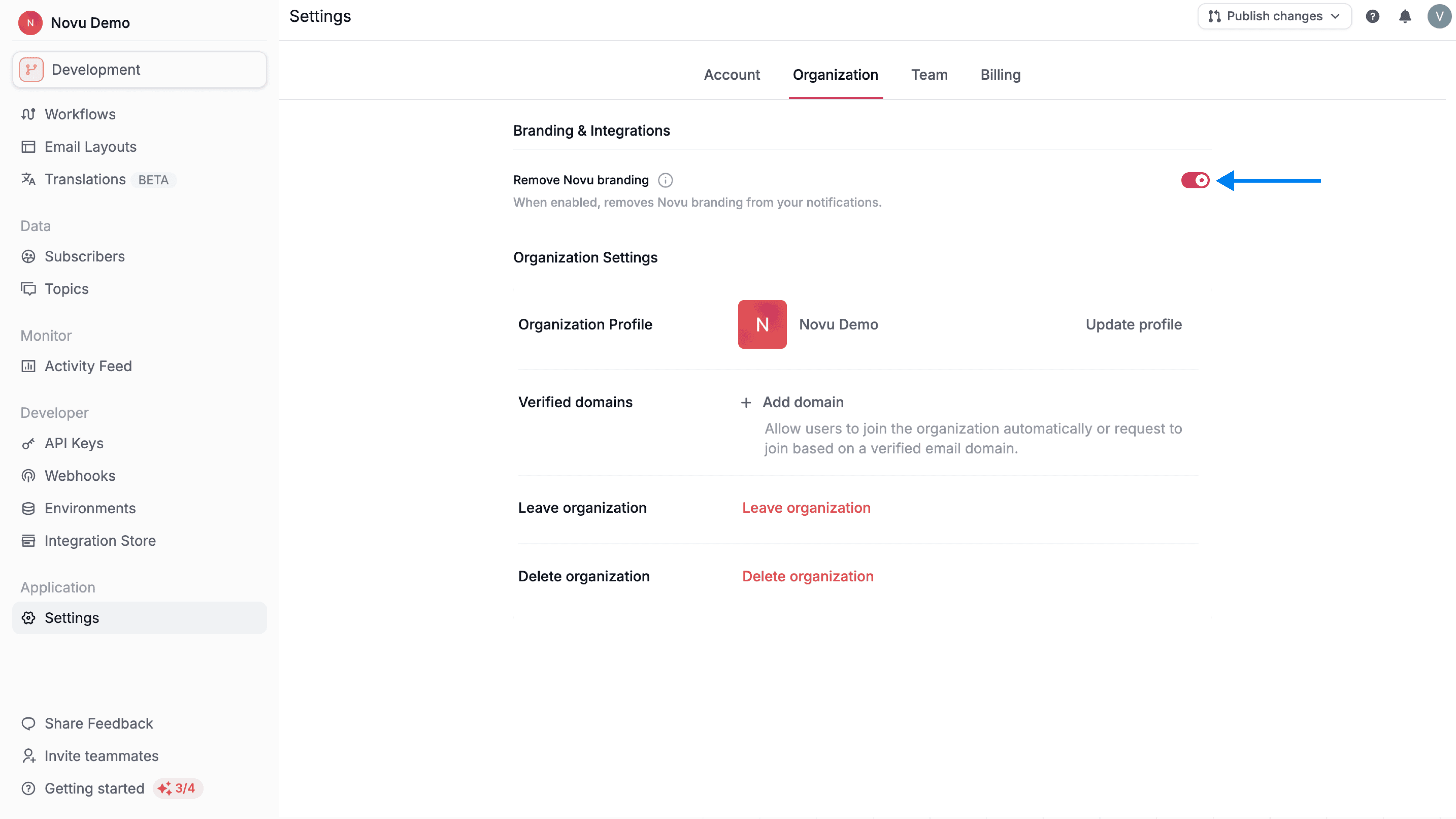 If you see this toggle disabled, confirm that your organization is on a paid plan. This toggle is disabled on the free plan.