> ## Documentation Index
> Fetch the complete documentation index at: https://novu-c5de82d9-docs-homepage-redesign.mintlify.site/llms.txt
> Use this file to discover all available pages before exploring further.
# Pusher Beams Push Integration with Novu
> Connect Pusher Beams to Novu to send push notifications through notification workflows. Step-by-step credential setup.
[Pusher Beams](https://pusher.com/beams/) is a cross-platform push notification API service provided by Pusher.
This guide explains the process of configuring and using Pusher Beams with Novu, from getting your credentials to sending your first notification.
## How to configure Pusher Beams with Novu
Before you can send notifications, you must get your credentials from a Pusher Beams instance and add them to your Novu integration settings.
### Step 1: Get your Pusher Beams credentials
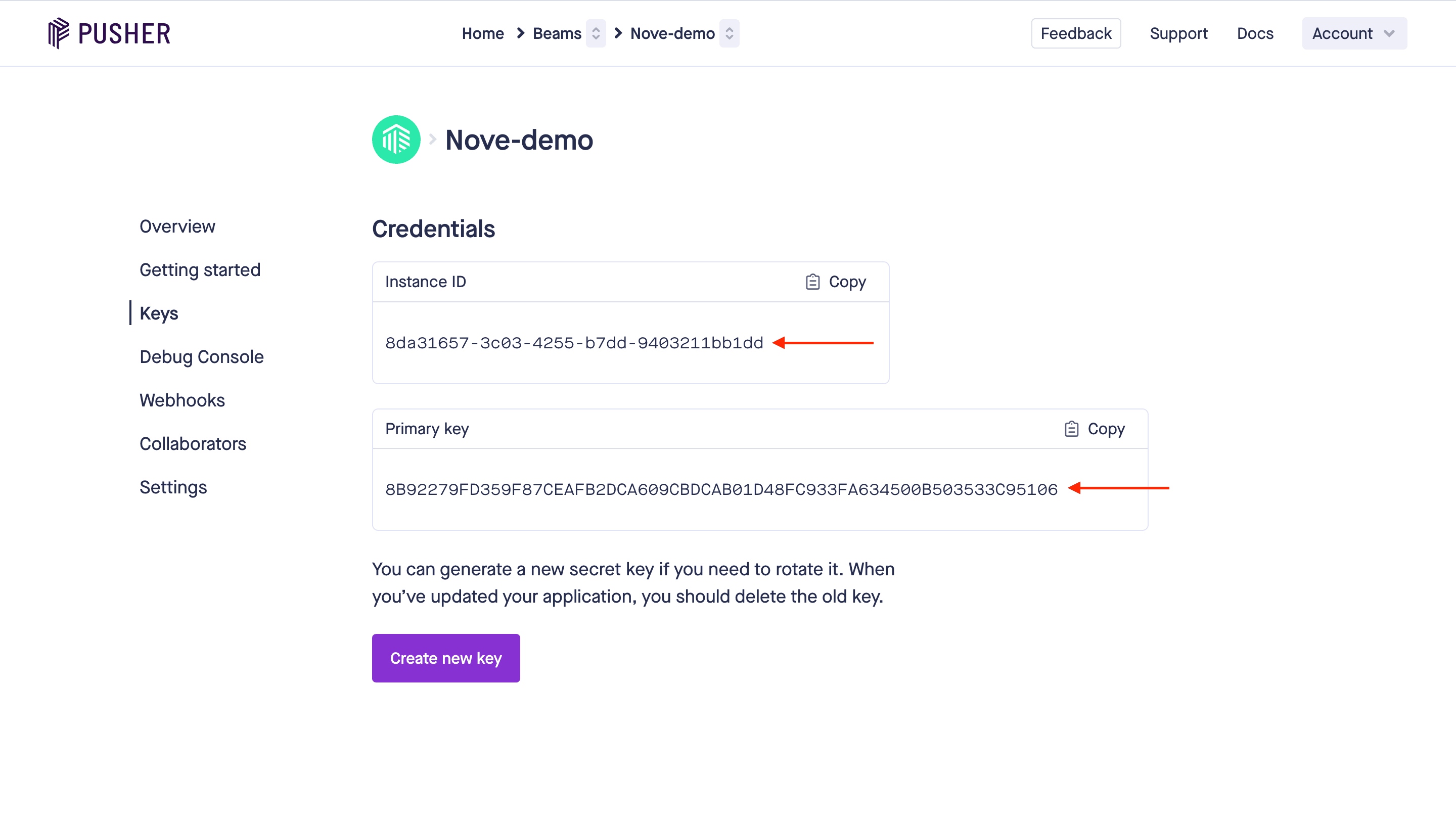
To enable Pusher Beams integration, you need to create a Pusher Beams Instance and use both `Instance ID` and `Secret Key` from the Instance [dashboard](https://dashboard.pusher.com/beams/).
Log in to the Pusher Beams dashboard.
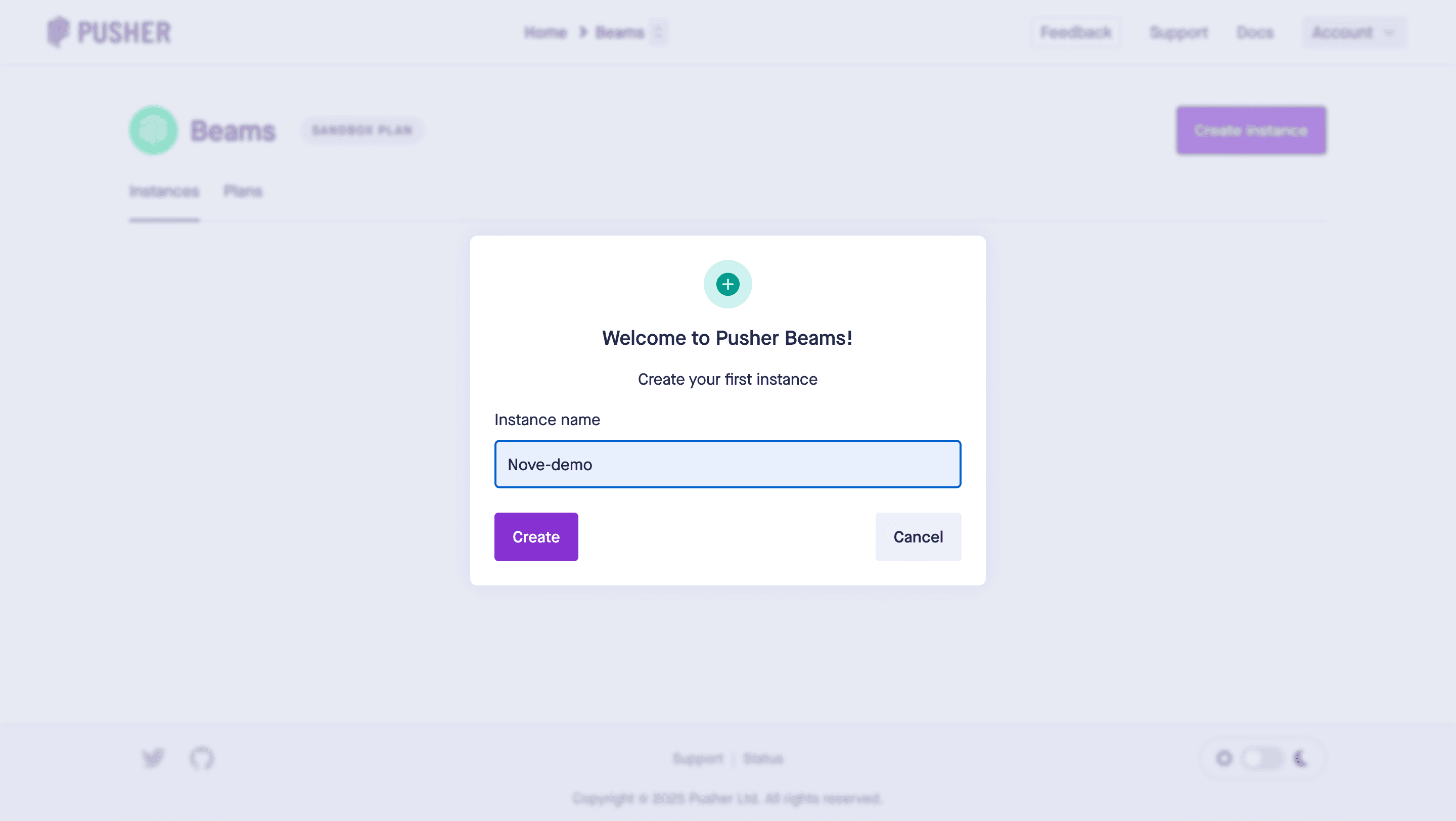
Click **Create instance**.
Enter the instance name, and then click **Create**.
 In the instance dashboard, click **Keys** from the sidebar, then copy and store your **Instance ID** and **Primary key** you will need them in [Step 2](/platform/integrations/push/pusher-beams#step-2-connect-pusher-beams-to-novu).
 ### Step 2: Connect Pusher Beams to Novu
Next, add these credentials to your Pusher Beams integration in the Novu dashboard.
Log in to the Novu dashboard.
On the Novu dashboard, navigate to the **Integration Store**.
Click **Connect Provider**.
Click the **Push** tab, then select **Pusher Beams**.
In the Pusher Beams integration form, paste your **Instance ID** and **Secret Key** into the corresponding fields.
### Step 2: Connect Pusher Beams to Novu
Next, add these credentials to your Pusher Beams integration in the Novu dashboard.
Log in to the Novu dashboard.
On the Novu dashboard, navigate to the **Integration Store**.
Click **Connect Provider**.
Click the **Push** tab, then select **Pusher Beams**.
In the Pusher Beams integration form, paste your **Instance ID** and **Secret Key** into the corresponding fields.
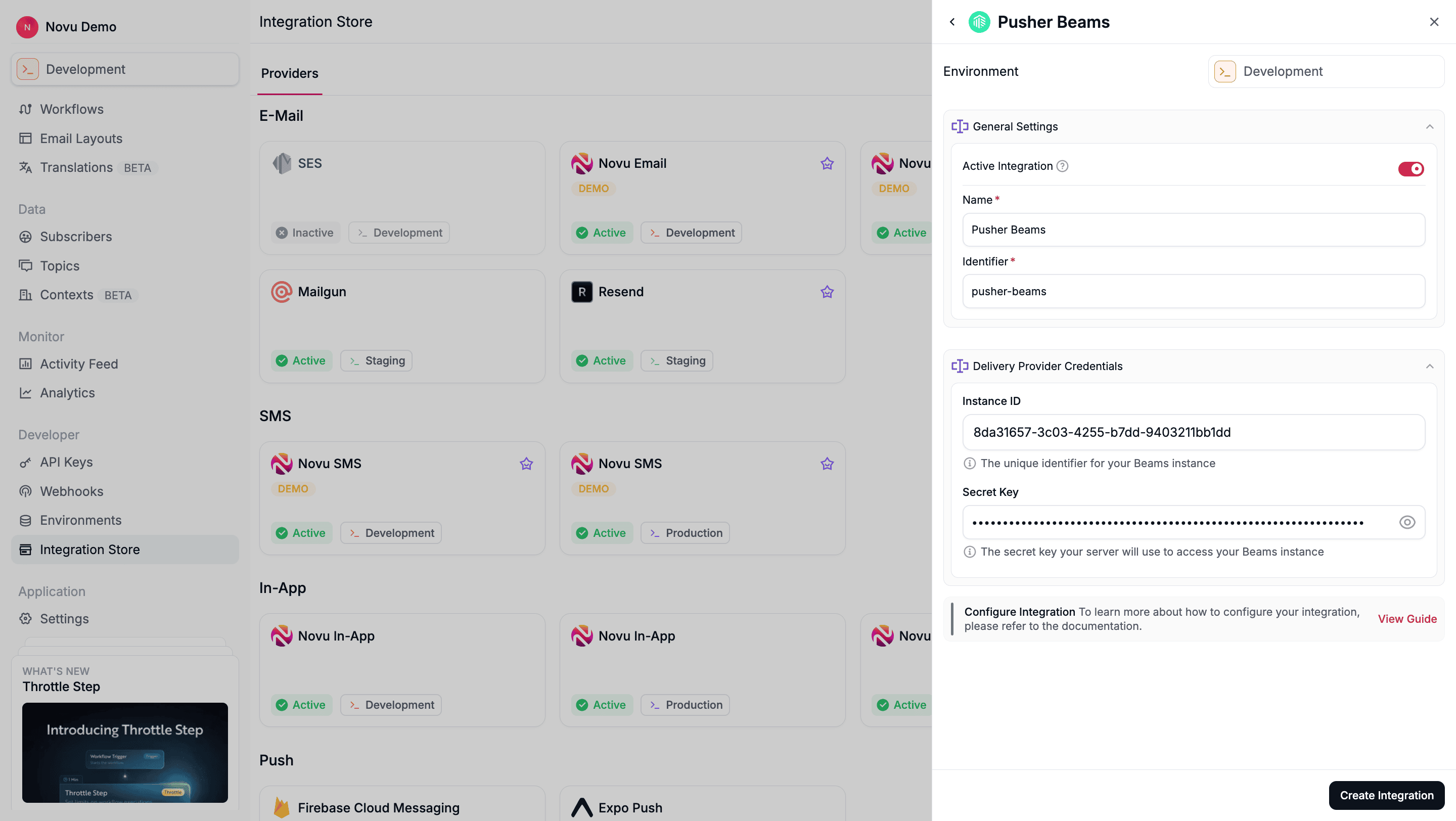 Click **Create Integration**.
## Using Pusher Beams with Novu
Once your integration is configured, you can start sending push notifications by registering your subscribers' `userId` and triggering a workflow.
### Step 1: Add subscriber device token
After [setting up the Pusher Beams SDK](https://pusher.com/docs/beams/reference/all-libraries/) in your application, you must associate users with their devices using Pusher Beams' [Authenticated Users](https://pusher.com/docs/beams/guides/publish-to-specific-user/web/) feature. This assigns them a `userId`.
To target a Pusher Beams user from Novu, you must register this `userId` as the `deviceToken` for their Novu subscriber profile. You can retrieve this value using the [`getUserId()`](https://pusher.com/docs/beams/reference/web/#getuserid) method from the Pusher Beams SDK.
You can do this by making an API call to [update the subscriber's credentials](/api-reference/subscribers/update-provider-credentials).
```typescript theme={null}
import { Novu } from '@novu/api';
import { ChatOrPushProviderEnum } from "@novu/api/models/components";
const novu = new Novu({
secretKey: "",
// Required if using EU region
// serverURL: "https://eu.api.novu.co",
});
await novu.subscribers.credentials.update(
{
providerId: ChatOrPushProviderEnum.PusherBeams,
// Use integrationIdentifier to store device tokens for a specific integration
integrationIdentifier: "pusher-beams-MnGLxp8uy",
credentials: {
deviceTokens: ["token1", "token2", "token3"],
},
},
"subscriberId"
);
```
```bash theme={null}
curl -L -X PUT 'https://api.novu.co/v1/subscribers//credentials' \
-H 'Content-Type: application/json' \
-H 'Accept: application/json' \
-H 'Authorization: ApiKey ' \
-d '{
"providerId": "pusher-beams",
"deviceTokens": ['userId-from-pusher-beams'],
"integrationIdentifier": "pusher-beams-MnGLxp8uy"
}'
```
### Step 2: Send a notification
Now you're ready to send a push notification. [Create a workflow with a Push step](/platform/workflow/create-a-workflow) and trigger it. Novu sends the notification to the `userId`'s associated with the subscriber.
The example below demonstrates a simple trigger using Novu’s SDK.
```typescript theme={null}
import { Novu } from '@novu/api';
const novu = new Novu({
secretKey: "",
// Required if using EU region
// serverURL: "https://eu.api.novu.co",
});
await novu.trigger({
workflowId: "workflowId",
to: {
subscriberId: "subscriberId",
},
payload: {
custom_data: 'custom_data', // the payload will be sent as notification data object. Cannot contain the key "pusher"
},
});
```
Click **Create Integration**.
## Using Pusher Beams with Novu
Once your integration is configured, you can start sending push notifications by registering your subscribers' `userId` and triggering a workflow.
### Step 1: Add subscriber device token
After [setting up the Pusher Beams SDK](https://pusher.com/docs/beams/reference/all-libraries/) in your application, you must associate users with their devices using Pusher Beams' [Authenticated Users](https://pusher.com/docs/beams/guides/publish-to-specific-user/web/) feature. This assigns them a `userId`.
To target a Pusher Beams user from Novu, you must register this `userId` as the `deviceToken` for their Novu subscriber profile. You can retrieve this value using the [`getUserId()`](https://pusher.com/docs/beams/reference/web/#getuserid) method from the Pusher Beams SDK.
You can do this by making an API call to [update the subscriber's credentials](/api-reference/subscribers/update-provider-credentials).
```typescript theme={null}
import { Novu } from '@novu/api';
import { ChatOrPushProviderEnum } from "@novu/api/models/components";
const novu = new Novu({
secretKey: "",
// Required if using EU region
// serverURL: "https://eu.api.novu.co",
});
await novu.subscribers.credentials.update(
{
providerId: ChatOrPushProviderEnum.PusherBeams,
// Use integrationIdentifier to store device tokens for a specific integration
integrationIdentifier: "pusher-beams-MnGLxp8uy",
credentials: {
deviceTokens: ["token1", "token2", "token3"],
},
},
"subscriberId"
);
```
```bash theme={null}
curl -L -X PUT 'https://api.novu.co/v1/subscribers//credentials' \
-H 'Content-Type: application/json' \
-H 'Accept: application/json' \
-H 'Authorization: ApiKey ' \
-d '{
"providerId": "pusher-beams",
"deviceTokens": ['userId-from-pusher-beams'],
"integrationIdentifier": "pusher-beams-MnGLxp8uy"
}'
```
### Step 2: Send a notification
Now you're ready to send a push notification. [Create a workflow with a Push step](/platform/workflow/create-a-workflow) and trigger it. Novu sends the notification to the `userId`'s associated with the subscriber.
The example below demonstrates a simple trigger using Novu’s SDK.
```typescript theme={null}
import { Novu } from '@novu/api';
const novu = new Novu({
secretKey: "",
// Required if using EU region
// serverURL: "https://eu.api.novu.co",
});
await novu.trigger({
workflowId: "workflowId",
to: {
subscriberId: "subscriberId",
},
payload: {
custom_data: 'custom_data', // the payload will be sent as notification data object. Cannot contain the key "pusher"
},
});
```