> ## Documentation Index
> Fetch the complete documentation index at: https://novu-c5de82d9-docs-homepage-redesign.mintlify.site/llms.txt
> Use this file to discover all available pages before exploring further.
# HTTP Step
> Learn how to use HTTP step to make external HTTP requests.
The HTTP step is an Action step that allows workflows to call external APIs during execution. This provides a native way to interact with systems outside Novu directly from your workflows. It is useful for tasks such as enriching data, enabling conditional branching based on external responses, or communicating with internal delivery systems.
This guide explains how to add and configure an HTTP step for your specific needs.
This feature is currently in public beta, please contact us at [support@novu.co](mailto:support@novu.co) to enable it for your organization.
## Adding an HTTP step
You can add an HTTP step anywhere within a workflow. When workflow execution reaches this step, the workflow will perform the configured request and the response can be used by steps that follow.
## Configuring the request
You can configure the HTTP request using the following properties:
* **Method**: Select the standard HTTP method such as `GET`, `POST`, `PUT`, `PATCH`, or `DELETE`.
* **URL**: Provide the destination endpoint for the request. A placeholder URL is included by default to help you test the behavior quickly.
* **Headers**: Define any required HTTP headers. These can be input as key-value pairs.
* **Body**: Provide the request payload. As with headers, you can use key-value pairs.
* **Response Schema**: Define the response schema for the API response. It is similar to defining the payload schema for the workflow. Response schema validation can also be enforced at the HTTP step level.
### Injecting workflow context
The HTTP step supports LiquidJS across all configuration fields, including the `URL`, `Headers`, and `Body`. This allows you to dynamically inject variables from the workflow context into your API request. You can use data from the subscriber, the event payload, or results from previous steps.
## Testing the HTTP request
You can test your configured HTTP request directly from the step editor without running a full workflow. This helps you verify the configuration and observe the API behavior.
Test executions performed in the step editor do not create workflow activity logs. Any validation or preview errors are surfaced directly on the step preview pane so you can resolve them before finalizing the configuration.
## Consuming the API response
When the HTTP request succeeds, the API response is stored in the step results. You can access these results in subsequent steps or condition rules using the `{{steps.step_id.responseFieldName}}` variable.
When consuming these response values in the channel step editors or in step conditions, you will see available response fields in variable autocomplete.
The example below determines whether to send an email using the `shouldSendEmail` field from the HTTP response in the email step condition. It uses the `{{steps.http-request-step.shouldSendEmail}}` variable, where `http-request-step` is the step id and `shouldSendEmail` is the response field name.
Similarly, you can use the response fields in the email step content to personalize the email content.
## Error handling and failure behavior
The HTTP step treats the following scenarios as failures:
* Non-2xx HTTP response status codes.
* Network timeouts.
* Network errors.
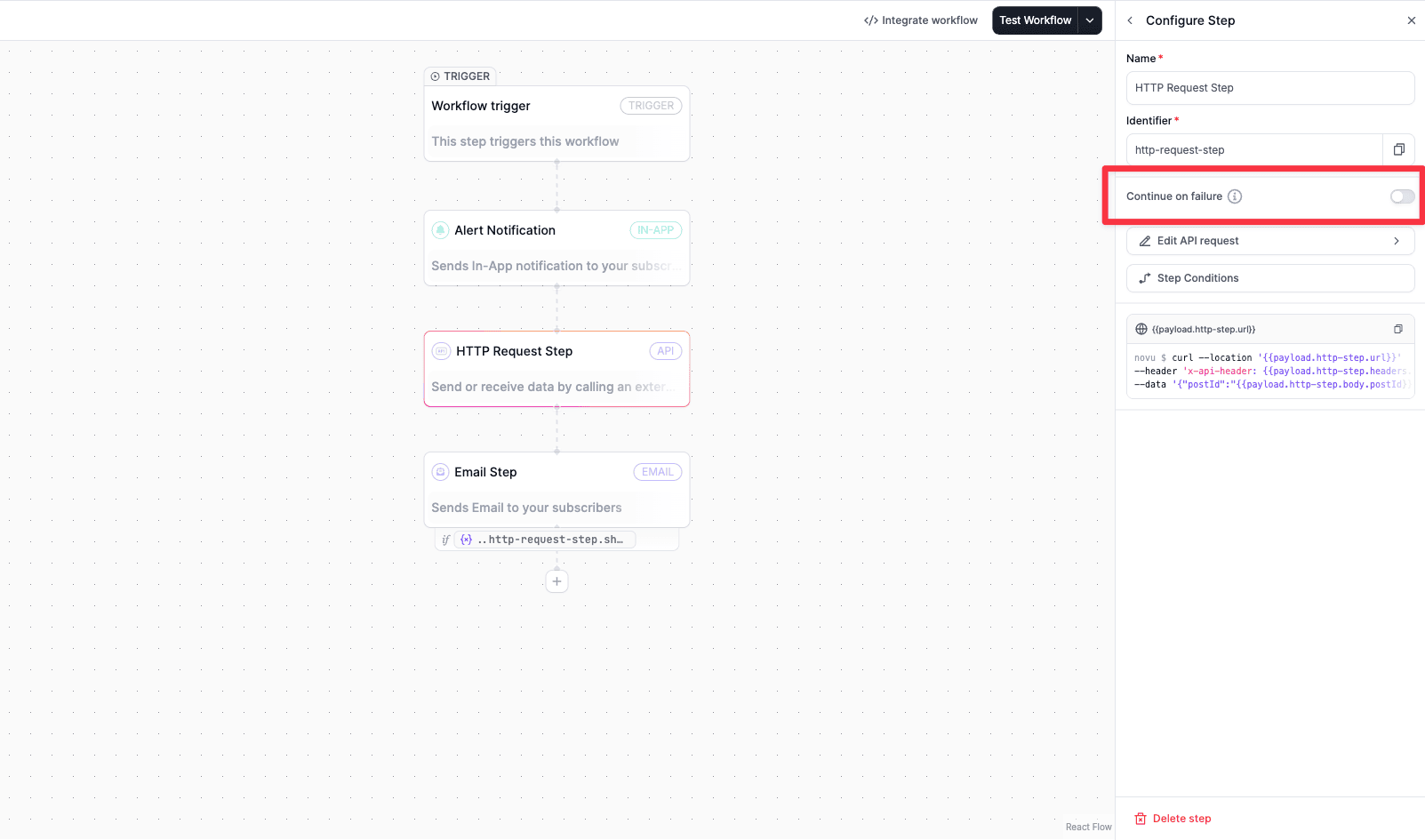
You can control what happens when a step fails. The workflow can be configured to either **continue** or **stop** execution if the HTTP request encounters an error.
 ## Securing HTTP requests
With each API request, novu send `novu-signature` header. This header is a HMAC signature of the request body and the timestamp. You can verify the authenticity of the request by verifying the HMAC signature. Below example shows how to verify the HMAC signature in a Next.js API route. Here, Novu secret key is used to generate the HMAC signature. You can copy the secret key from the [Novu API Keys](https://dashboard.novu.co/api-keys) page.
Replace `YOUR_SUBSCRIBER_ID` with a subscriber from your Novu dashboard and store your secret key as `NOVU_SECRET_KEY` in environment variables.
I need to implement an HTTP endpoint that will be called by Novu's notification workflow engine.
## Request my endpoint will receive
Method: POST
URL: [https://your-app.example.com/api/novu-webhook](https://your-app.example.com/api/novu-webhook)
Headers:
Content-Type: application/json
novu-signature: t=TIMESTAMP,v1=HMAC\_SHA256\_SIGNATURE
Body (JSON):
```json theme={null}
{
"subscriberId": "YOUR_SUBSCRIBER_ID",
"payload": {
"orderId": "order-123",
"status": "shipped"
}
}
```
## Signature verification
Every request from Novu includes a `novu-signature` header to prove authenticity.
Format: `t=TIMESTAMP,v1=SIGNATURE`
To verify:
1. Parse the header: split on comma, extract `t` (timestamp) and `v1` (HMAC)
2. Build the signed string: timestamp dot JSON.stringify(requestBody)
3. Compute HMAC-SHA256 of that string using your Novu secret key
4. Compare (constant-time) your computed HMAC against the `v1` value
5. Reject requests where the timestamp is more than 5 minutes old
Reference: [https://docs.novu.co/platform/workflow/add-and-configure-steps/configure-action-steps/http-step](https://docs.novu.co/platform/workflow/add-and-configure-steps/configure-action-steps/http-step)
## What to generate
Please write a complete endpoint handler (Node.js/Express by default, or match my project's framework) that:
1. Accepts the POST request described above
2. Reads the raw request body and verifies the `novu-signature` header
3. Parses the JSON body and extracts relevant fields
4. Implements placeholder business logic
5. Returns a 200 JSON response
Store NOVU\_SECRET\_KEY in environment variables. Do not create documentation files.
```typescript title="api/novu-http-step-request/route.ts" theme={null}
import { NextRequest, NextResponse } from "next/server";
import { createHmac, timingSafeEqual } from "node:crypto";
const novuSecretKey = process.env.NOVU_SECRET_KEY as string;
export async function POST(req: NextRequest) {
const headers = Object.fromEntries(req.headers.entries());
let body = {};
try {
body = await req.json();
} catch {
// GET requests usually don't have a body
}
const parts = headers["novu-signature"].split(",");
const timestampPart = parts.find((p) => p.startsWith("t="));
const signaturePart = parts.find((p) => p.startsWith("v1="));
const timestamp = Number(timestampPart?.split("=")[1]);
const providedSignature = signaturePart?.split("=")[1];
// Verify the timestamp is not stale
const currentTimestampTime = Date.now();
const fiveMinutes = 5 * 60 * 1000;
const providedTimestamp = timestamp;
// If the timestamp is stale, return a 401 error
if (currentTimestampTime - providedTimestamp > fiveMinutes) {
return NextResponse.json({ error: "stale request" }, { status: 401 });
}
const generatedSignature = createHmac("sha256", novuSecretKey)
.update(`${timestamp}.${JSON.stringify(body)}`)
.digest("hex");
// Verify the signature
const providedBuf = Buffer.from(providedSignature, "hex");
const generatedBuf = Buffer.from(generatedSignature, "hex");
const valid =
providedBuf.length === generatedBuf.length &&
timingSafeEqual(generatedBuf, providedBuf);
// If the signature is not valid, return a 401 error
if (!valid) {
return NextResponse.json({ error: "Not authorized" }, { status: 401 });
}
return NextResponse.json({ message: "Authorized" }, { status: 200 });
}
```
## Use cases
The HTTP step can be utilized in several ways within your workflows:
### Data enrichment during workflow runs
You might need additional subscriber or event data before sending a notification. An HTTP step can call your internal CRM or user database to fetch extra context, which can then be injected into the notification content using the step results namespace.
### Conditional branching based on external systems
You can use the HTTP step to check a condition in an external service. For example, you can query an API to determine if a user has an active premium subscription, and then use the response in a subsequent condition step to send a different type of notification based on their status.
### Internal delivery systems
If you have an internal system that requires a payload when certain events happen, you can trigger an HTTP step to ping that system with the relevant workflow context without needing to expose it to end users.
## Securing HTTP requests
With each API request, novu send `novu-signature` header. This header is a HMAC signature of the request body and the timestamp. You can verify the authenticity of the request by verifying the HMAC signature. Below example shows how to verify the HMAC signature in a Next.js API route. Here, Novu secret key is used to generate the HMAC signature. You can copy the secret key from the [Novu API Keys](https://dashboard.novu.co/api-keys) page.
Replace `YOUR_SUBSCRIBER_ID` with a subscriber from your Novu dashboard and store your secret key as `NOVU_SECRET_KEY` in environment variables.
I need to implement an HTTP endpoint that will be called by Novu's notification workflow engine.
## Request my endpoint will receive
Method: POST
URL: [https://your-app.example.com/api/novu-webhook](https://your-app.example.com/api/novu-webhook)
Headers:
Content-Type: application/json
novu-signature: t=TIMESTAMP,v1=HMAC\_SHA256\_SIGNATURE
Body (JSON):
```json theme={null}
{
"subscriberId": "YOUR_SUBSCRIBER_ID",
"payload": {
"orderId": "order-123",
"status": "shipped"
}
}
```
## Signature verification
Every request from Novu includes a `novu-signature` header to prove authenticity.
Format: `t=TIMESTAMP,v1=SIGNATURE`
To verify:
1. Parse the header: split on comma, extract `t` (timestamp) and `v1` (HMAC)
2. Build the signed string: timestamp dot JSON.stringify(requestBody)
3. Compute HMAC-SHA256 of that string using your Novu secret key
4. Compare (constant-time) your computed HMAC against the `v1` value
5. Reject requests where the timestamp is more than 5 minutes old
Reference: [https://docs.novu.co/platform/workflow/add-and-configure-steps/configure-action-steps/http-step](https://docs.novu.co/platform/workflow/add-and-configure-steps/configure-action-steps/http-step)
## What to generate
Please write a complete endpoint handler (Node.js/Express by default, or match my project's framework) that:
1. Accepts the POST request described above
2. Reads the raw request body and verifies the `novu-signature` header
3. Parses the JSON body and extracts relevant fields
4. Implements placeholder business logic
5. Returns a 200 JSON response
Store NOVU\_SECRET\_KEY in environment variables. Do not create documentation files.
```typescript title="api/novu-http-step-request/route.ts" theme={null}
import { NextRequest, NextResponse } from "next/server";
import { createHmac, timingSafeEqual } from "node:crypto";
const novuSecretKey = process.env.NOVU_SECRET_KEY as string;
export async function POST(req: NextRequest) {
const headers = Object.fromEntries(req.headers.entries());
let body = {};
try {
body = await req.json();
} catch {
// GET requests usually don't have a body
}
const parts = headers["novu-signature"].split(",");
const timestampPart = parts.find((p) => p.startsWith("t="));
const signaturePart = parts.find((p) => p.startsWith("v1="));
const timestamp = Number(timestampPart?.split("=")[1]);
const providedSignature = signaturePart?.split("=")[1];
// Verify the timestamp is not stale
const currentTimestampTime = Date.now();
const fiveMinutes = 5 * 60 * 1000;
const providedTimestamp = timestamp;
// If the timestamp is stale, return a 401 error
if (currentTimestampTime - providedTimestamp > fiveMinutes) {
return NextResponse.json({ error: "stale request" }, { status: 401 });
}
const generatedSignature = createHmac("sha256", novuSecretKey)
.update(`${timestamp}.${JSON.stringify(body)}`)
.digest("hex");
// Verify the signature
const providedBuf = Buffer.from(providedSignature, "hex");
const generatedBuf = Buffer.from(generatedSignature, "hex");
const valid =
providedBuf.length === generatedBuf.length &&
timingSafeEqual(generatedBuf, providedBuf);
// If the signature is not valid, return a 401 error
if (!valid) {
return NextResponse.json({ error: "Not authorized" }, { status: 401 });
}
return NextResponse.json({ message: "Authorized" }, { status: 200 });
}
```
## Use cases
The HTTP step can be utilized in several ways within your workflows:
### Data enrichment during workflow runs
You might need additional subscriber or event data before sending a notification. An HTTP step can call your internal CRM or user database to fetch extra context, which can then be injected into the notification content using the step results namespace.
### Conditional branching based on external systems
You can use the HTTP step to check a condition in an external service. For example, you can query an API to determine if a user has an active premium subscription, and then use the response in a subsequent condition step to send a different type of notification based on their status.
### Internal delivery systems
If you have an internal system that requires a payload when certain events happen, you can trigger an HTTP step to ping that system with the relevant workflow context without needing to expose it to end users.