> ## Documentation Index
> Fetch the complete documentation index at: https://novu-c5de82d9-docs-homepage-redesign.mintlify.site/llms.txt
> Use this file to discover all available pages before exploring further.
# Manage contexts
> Learn how to create, update, and delete contexts in Novu using the dashboard, or API.
Novu lets you manage contexts through the Novu dashboard, or the Novu API. This lets you create, view, update, and delete context entities to suit your application's needs.
You can pass a maximum of five contexts per workflow trigger and the serialized `data` object for each context is limited to 64KB.
## Context object schema
When defining contexts, Novu supports multiple formats per key-value pair that let you store and reference metadata relevant to your workflows and templates.
Each context consists of:
* A `type` (for example, tenant, app, or region).
* An `id` that uniquely identifies the specific context instance.
* An optional `data` object that holds additional properties available to your templates.
Supported data formats include:
```typescript theme={null}
await novu.trigger({
workflowId: "workflowId",
to: { subscriberId: 'user123' },
payload: { userName: 'John' },
context: {
// Simple string format
tenant: 'acme-corp',
// Rich object format (ID only)
app: { id: 'jira' },
// Rich object format (ID + data)
region: {
id: 'us-east',
data: {
name: 'US East',
timezone: 'America/New_York',
currency: 'USD'
}
}
}
});
```
## Create a Context
You can create a new context via the Novu dashboard or API when you want to register reusable metadata. After creation, this context becomes available to all workflows and templates within your environment.
### Create a context via dashboard
Use the dashboard to manually define contexts that represent key business entities.
Log in to the Novu dashboard
Click **Contexts** on the sidebar.
Click **Create context**.
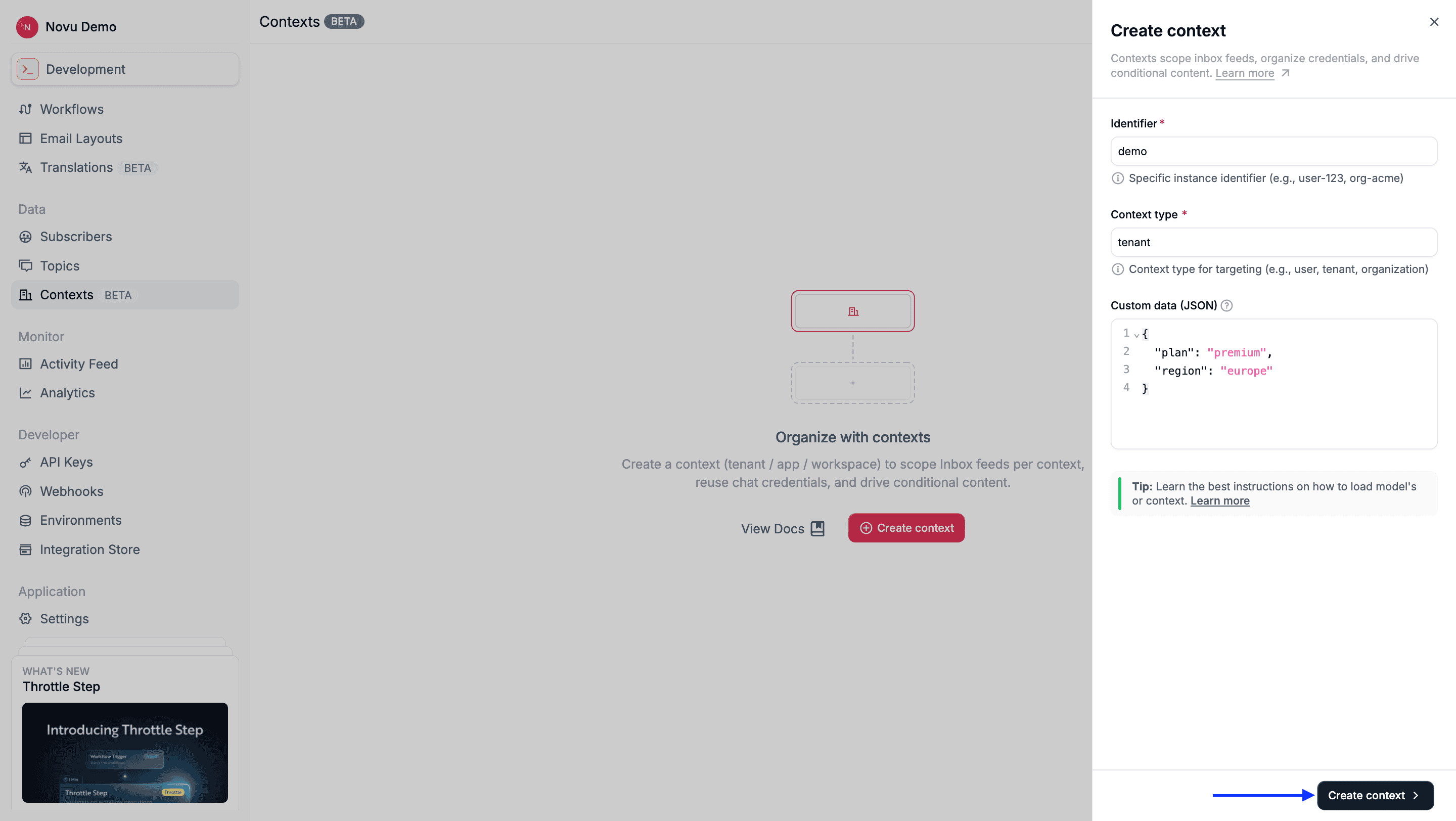
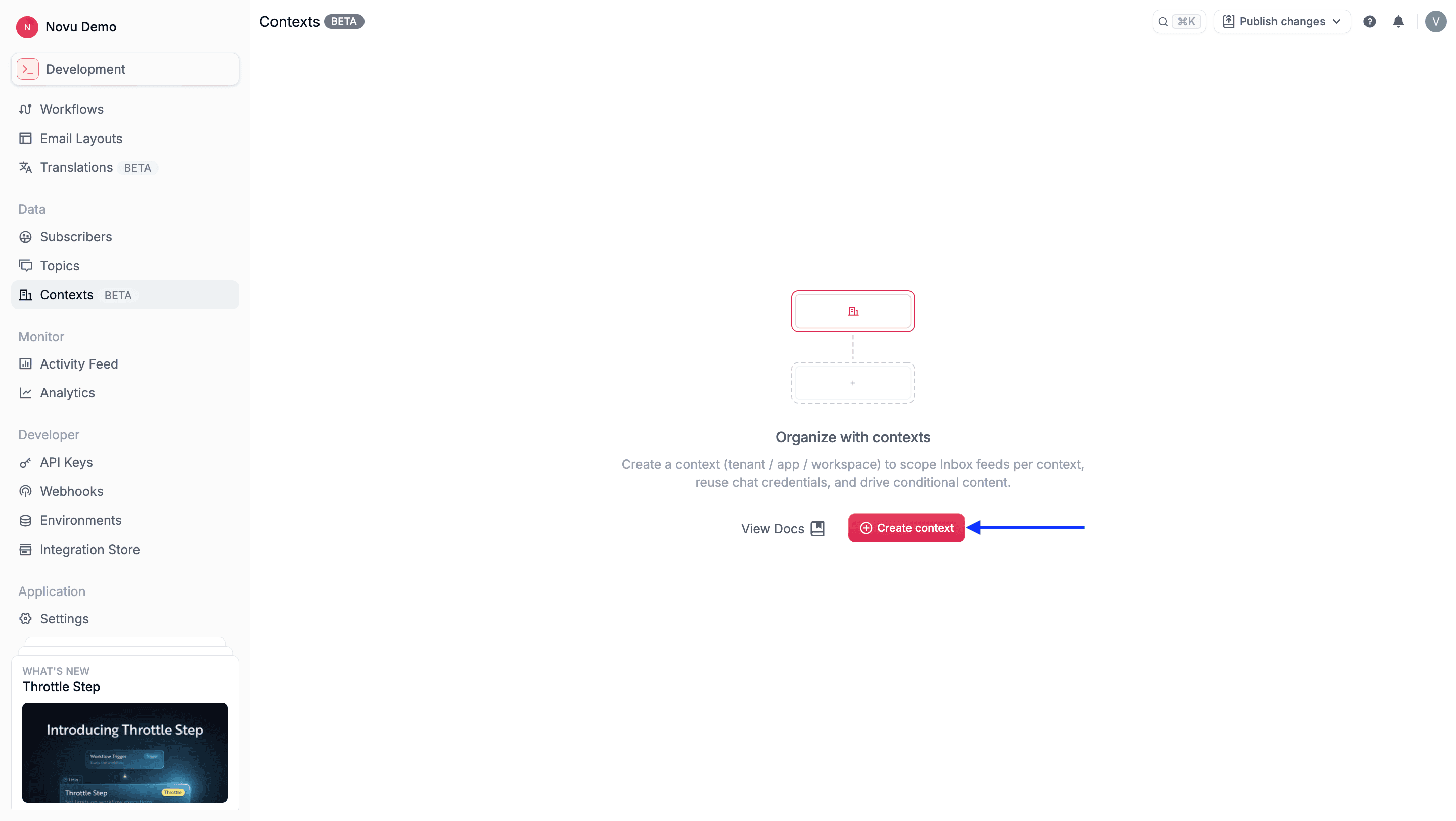 Complete the following fields:
* **Identifier**: A unique identifier within that type (for example, acme-corp).
* **Context type**: A category such as tenant, app, or region.
* **Custom data (JSON)**: An optional JSON object that contains metadata, such as branding, plan, or region details.
Click **Create context** to save the context.
Complete the following fields:
* **Identifier**: A unique identifier within that type (for example, acme-corp).
* **Context type**: A category such as tenant, app, or region.
* **Custom data (JSON)**: An optional JSON object that contains metadata, such as branding, plan, or region details.
Click **Create context** to save the context.
 ### Create a context via API
Novu provides an API to create a context. If a context with the same `type:id` combination already exists, then the request will fail.
```bash theme={null}
POST /v2/contexts
{
"type": "tenant",
"id": "acme-corp",
"data": {
"name": "Acme Corporation",
"plan": "enterprise"
}
}
```
### Create a context via API (Just-in-time)
Contexts can also be created automatically when you trigger a workflow that includes a new context object. If the specified `type:id` doesn’t exist, then Novu automatically creates it before running the workflow.
```jsx theme={null}
await novu.trigger({
workflowId: "workflowId",
to: { subscriberId: 'user@example.com' },
payload: { userName: 'John' },
context: {
tenant: 'acme-corp', // Created automatically if it doesn’t exist
app: 'jira'
}
});
```
If a matching context already exists, Novu reuses it as-is without modifying any stored data. This behavior ensures consistency and avoids accidental changes to shared metadata.
## Update a context
You can update a context’s data payload at any time. The context `type` and `id` remain immutable. However, to change an existing context’s data, you must explicitly update it through the dashboard or API.
#### Update a context via dashboard
Log in to the Novu dashboard.
Click **Contexts** on the sidebar.
Click on the context you wish to edit from the context list on the Context page.
Modify its data object in the UI.
Click **Save changes**.
### Update a context via API
Novu provides an API to update an existing context. The `data` object is replaced entirely during updates (not merged). Include all fields you want to retain.
```bash theme={null}
PATCH /v2/contexts/tenant/acme-corp
{
"data": {
"plan": "premium",
"region": "us-east"
}
}
```
## Retrieve a single context
You can retrieve a context to verify its data, confirm its creation, or inspect the metadata it holds.
### Retrieve a context via dashboard
Log in to the Novu dashboard
Click **Contexts** on the sidebar to view the list of all existing contexts.
Click any context entry to see its details.
### Retrieve a context via API
Novu provides an API to retrieve a single, specific context by providing its `type` and `id` in the URL.
```bash theme={null}
GET /v2/contexts/:type/:id
```
Here is an example:
```bash theme={null}
GET /v2/contexts/tenant/acme-corp
```
## List or search for contexts
You can list all contexts in your environment or search for specific ones by context type or ID.
### List or search for contexts via dashboard
Log in to the Novu dashboard
Click **Contexts** on the sidebar to view all contexts.
Use the search bar to filter by context type or ID.
### List or search for contexts via API
Novu provides an API that lists or searches available contexts. Use pagination and search parameters to retrieve subsets efficiently.
```bash theme={null}
GET /v2/contexts
GET /v2/contexts?search=acme
```
## Delete a context
Delete a context if it’s no longer needed. This action permanently removes the context from your Novu environment.
Deleting a context cannot be undone. Ensure the context is no longer required by any active or historical workflows you might need to analyze.
### Delete a context via dashboard
Log in to the Novu dashboard.
Click **Contexts** on the sidebar.
Click the context or the **...** icon on the row you want to remove.
A confirmation menu will appear.
### Create a context via API
Novu provides an API to create a context. If a context with the same `type:id` combination already exists, then the request will fail.
```bash theme={null}
POST /v2/contexts
{
"type": "tenant",
"id": "acme-corp",
"data": {
"name": "Acme Corporation",
"plan": "enterprise"
}
}
```
### Create a context via API (Just-in-time)
Contexts can also be created automatically when you trigger a workflow that includes a new context object. If the specified `type:id` doesn’t exist, then Novu automatically creates it before running the workflow.
```jsx theme={null}
await novu.trigger({
workflowId: "workflowId",
to: { subscriberId: 'user@example.com' },
payload: { userName: 'John' },
context: {
tenant: 'acme-corp', // Created automatically if it doesn’t exist
app: 'jira'
}
});
```
If a matching context already exists, Novu reuses it as-is without modifying any stored data. This behavior ensures consistency and avoids accidental changes to shared metadata.
## Update a context
You can update a context’s data payload at any time. The context `type` and `id` remain immutable. However, to change an existing context’s data, you must explicitly update it through the dashboard or API.
#### Update a context via dashboard
Log in to the Novu dashboard.
Click **Contexts** on the sidebar.
Click on the context you wish to edit from the context list on the Context page.
Modify its data object in the UI.
Click **Save changes**.
### Update a context via API
Novu provides an API to update an existing context. The `data` object is replaced entirely during updates (not merged). Include all fields you want to retain.
```bash theme={null}
PATCH /v2/contexts/tenant/acme-corp
{
"data": {
"plan": "premium",
"region": "us-east"
}
}
```
## Retrieve a single context
You can retrieve a context to verify its data, confirm its creation, or inspect the metadata it holds.
### Retrieve a context via dashboard
Log in to the Novu dashboard
Click **Contexts** on the sidebar to view the list of all existing contexts.
Click any context entry to see its details.
### Retrieve a context via API
Novu provides an API to retrieve a single, specific context by providing its `type` and `id` in the URL.
```bash theme={null}
GET /v2/contexts/:type/:id
```
Here is an example:
```bash theme={null}
GET /v2/contexts/tenant/acme-corp
```
## List or search for contexts
You can list all contexts in your environment or search for specific ones by context type or ID.
### List or search for contexts via dashboard
Log in to the Novu dashboard
Click **Contexts** on the sidebar to view all contexts.
Use the search bar to filter by context type or ID.
### List or search for contexts via API
Novu provides an API that lists or searches available contexts. Use pagination and search parameters to retrieve subsets efficiently.
```bash theme={null}
GET /v2/contexts
GET /v2/contexts?search=acme
```
## Delete a context
Delete a context if it’s no longer needed. This action permanently removes the context from your Novu environment.
Deleting a context cannot be undone. Ensure the context is no longer required by any active or historical workflows you might need to analyze.
### Delete a context via dashboard
Log in to the Novu dashboard.
Click **Contexts** on the sidebar.
Click the context or the **...** icon on the row you want to remove.
A confirmation menu will appear.
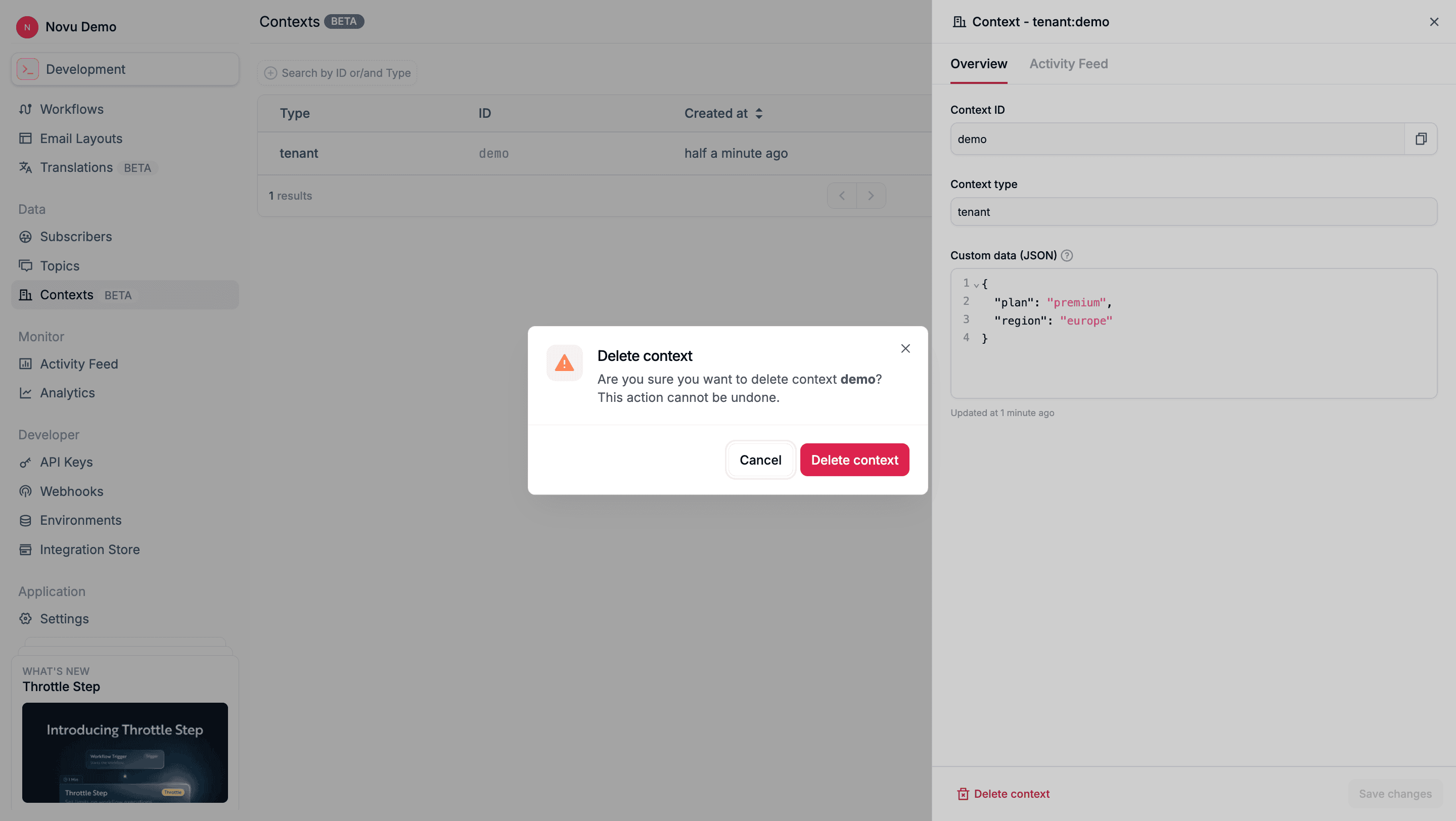
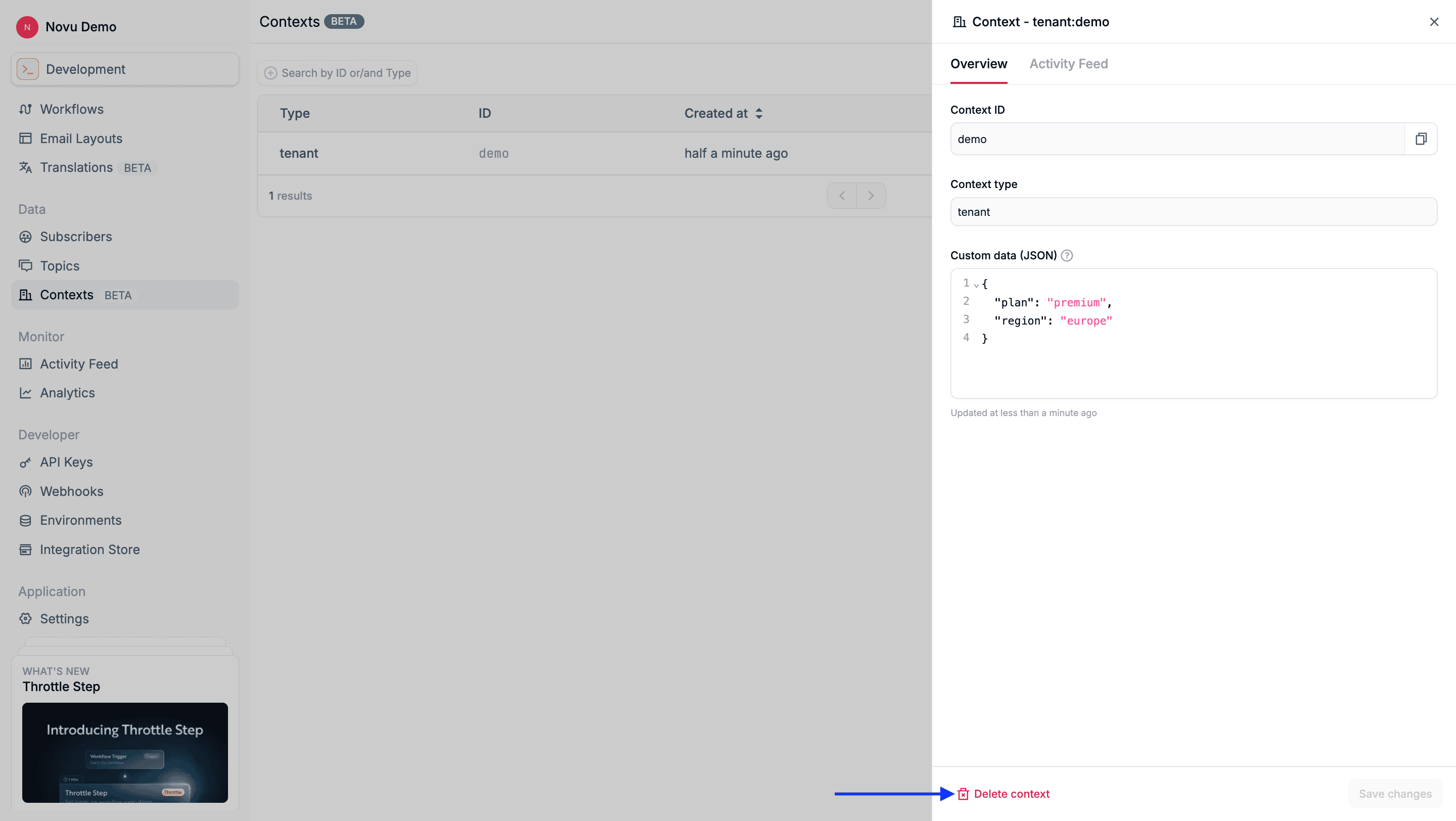 Select **Delete context** to confirm removal.
 ### Delete a context via API
Novu provides an API that you can use to delete a context. Once deleted, the context will no longer be available for use in new workflow executions.
```bash theme={null}
DELETE /v2/contexts/:type/:id
```
Here is an example:
```bash theme={null}
DELETE /v2/contexts/tenant/acme-corp
```
### Delete a context via API
Novu provides an API that you can use to delete a context. Once deleted, the context will no longer be available for use in new workflow executions.
```bash theme={null}
DELETE /v2/contexts/:type/:id
```
Here is an example:
```bash theme={null}
DELETE /v2/contexts/tenant/acme-corp
```