

Agents are currently in private beta. Please contact us at support@novu.co to get access.
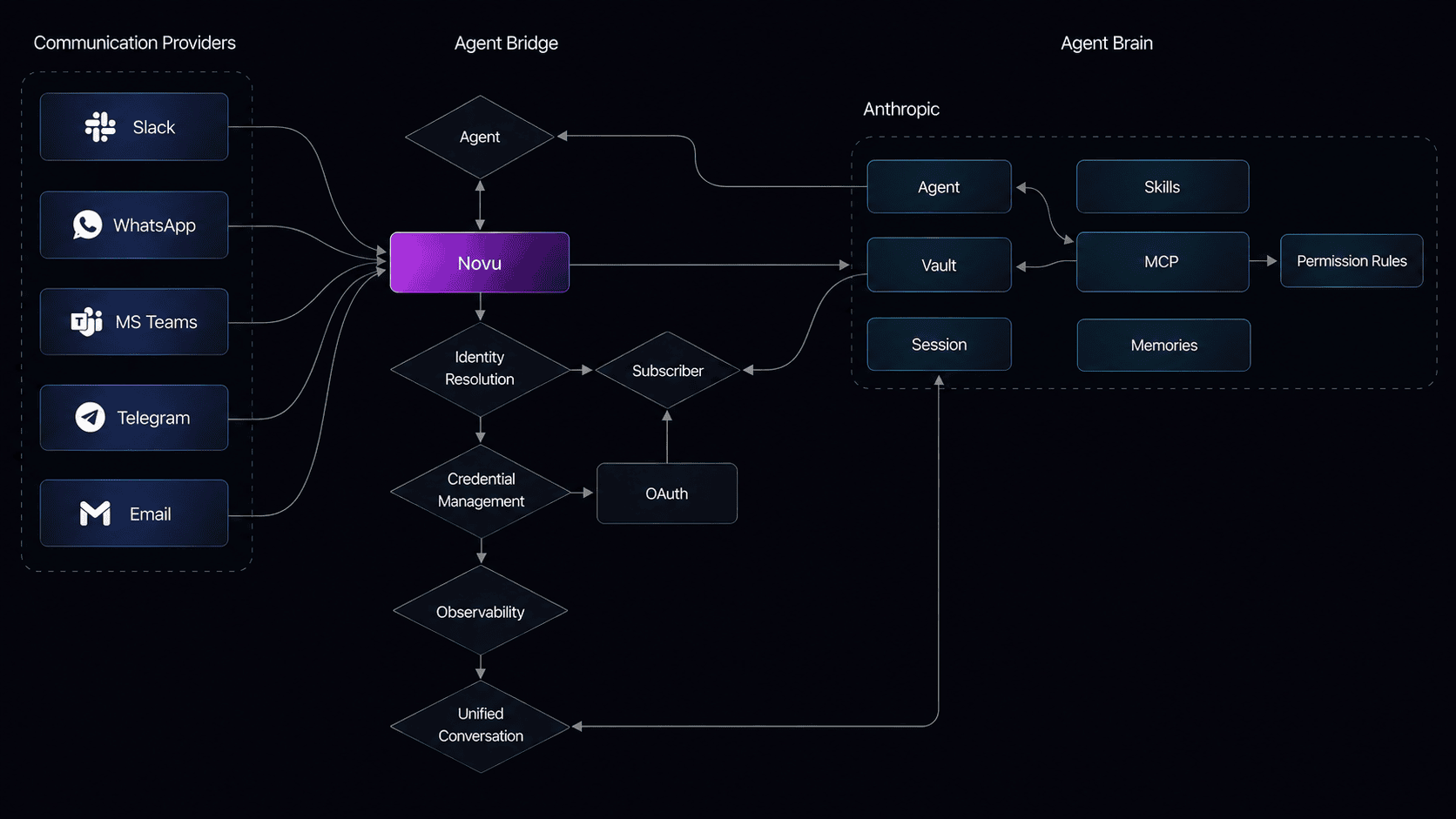
How it works
- A user sends a message on a connected provider (Slack, Microsoft Teams, email, etc.).
- Novu receives the message, resolves identity and conversation state, and forwards the full context to the AI platform.
- The platform processes the message using its built-in tools (bash, file operations, web search, grep, etc.), any MCP servers you enabled, and any custom skills you uploaded.
- Novu delivers the response back to the same thread on the provider.
What you configure
Setting up a managed agent involves five pieces, all configured from the Novu dashboard:- Connector: the AI platform that powers the agent (Claude today, with OpenAI and AWS Bedrock coming soon). You provide API credentials or use Novu demo credentials to start.
- System prompt: instructions that tell the agent who it is, how to respond, and what to avoid.
- Built-in tools: bash, file read/write/edit, glob, grep, web search, and web fetch are provided by the platform and available out of the box.
- MCP servers: external integrations like Linear, GitHub, Slack, and Notion that you enable from the dashboard. Some require end-user OAuth authorization.
- Custom skills: SKILL.md instruction files you upload from a GitHub URL or paste inline to teach the agent domain-specific workflows.
When to use a managed agent
Managed agents are a good fit when you want to get an agent running quickly without writing backend code. The platform handles tool calls, streaming, and chain-of-thought reasoning for you. If you need full control over the agent logic, want to call your own APIs directly in handlers, or need complex multi-step business flows, use a custom code agent instead.Next steps
Quickstart
Create a managed agent with Claude and connect it to Slack in under 10 minutes.
Concepts
Connectors, built-in tools, MCP servers, skills, and conversation flow in detail.
Configure MCP servers
Enable external tools for your managed agent.
Add skills
Upload custom skills to teach the agent new workflows.