Signals let you change conversation state without sending another chat message. Replies go to the user; signals update metadata, fire workflows, or mark a thread resolved. Use ctx.reply() when the user should see something. Use signals when you only need to persist data, trigger a Novu workflow, or close the conversation.

Signal types

SignalWhat it doesMethod
MetadataStore key-value data on the conversation (persists across messages)ctx.metadata.set(key, value)
TriggerFire a Novu workflow (email, push, SMS, multi-step)ctx.trigger(workflowId, options)
ResolveMark the conversation as resolved, with an optional summaryctx.resolve(summary?)
You can combine both in one handler turn: reply to the user, set metadata, call ctx.trigger() for an escalation email, and ctx.resolve() when the issue is done.

How signals are delivered

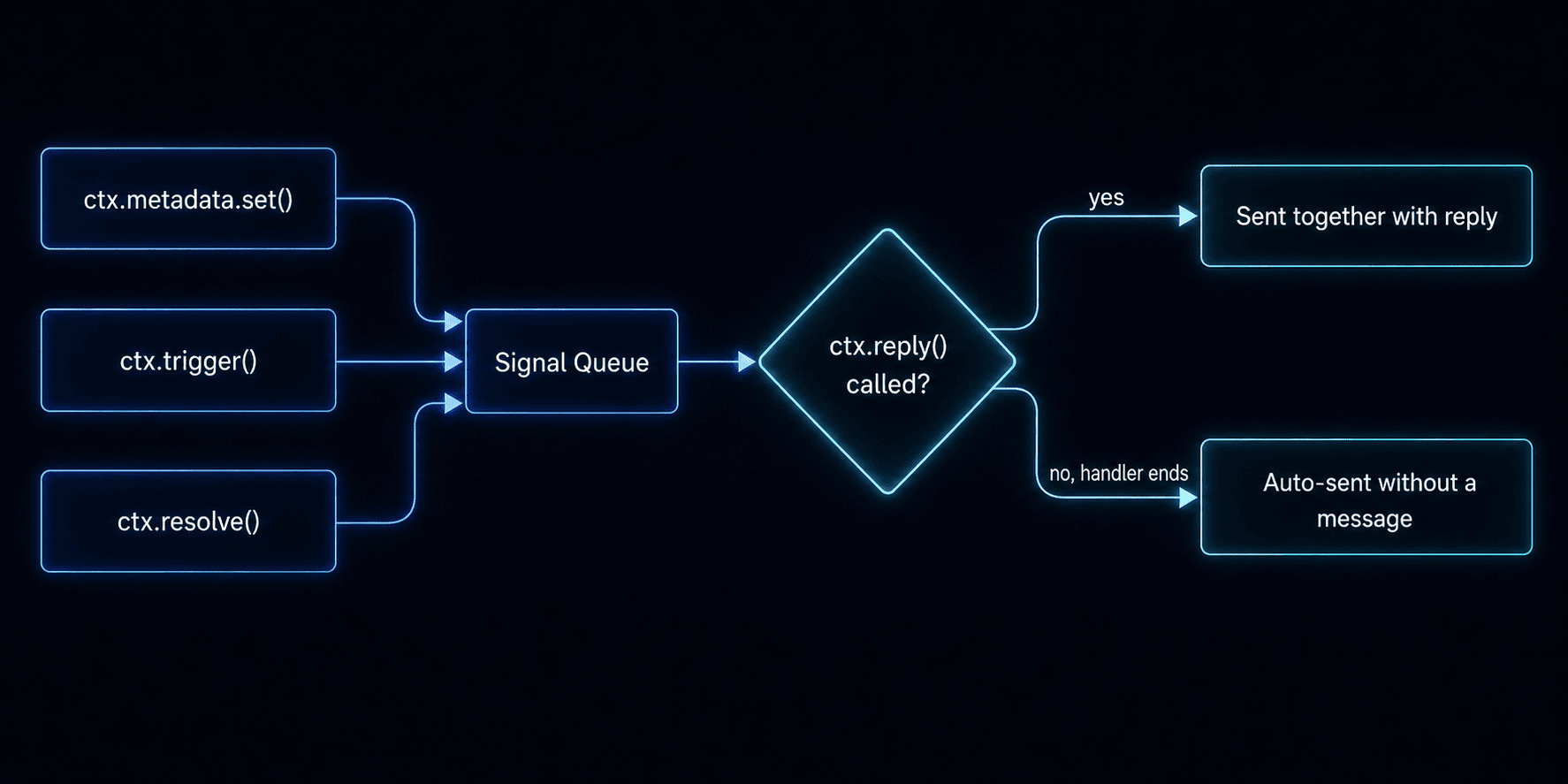
Signals are not sent the instant you call them. They are queued in memory and batched with your next ctx.reply() in a single HTTP request. That batches work into one request instead of several round trips. Signal delivery flow If your handler finishes without calling ctx.reply(), pending signals are still sent automatically.
Set metadata

Store key-value data on the conversation (up to 64 KB cumulative). Metadata persists across messages and is available in ctx.conversation.metadata on every subsequent handler call.
ctx.metadata.set('sentiment', 'positive');
ctx.metadata.set('ticketId', 'JIRA-1234');
Use metadata for intent, ticket IDs, escalation flags, or any state your agent needs across turns.

Trigger a workflow

Start any Novu workflow from a handler, the same workflows you use for email, push, or SMS elsewhere in your account.
ctx.trigger('escalation-email', {
  to: ctx.subscriber?.subscriberId,
  payload: { reason: 'User requested human support' },
});
Common patterns:
  • Escalation emails
  • CSAT surveys after resolution
  • Alerting on-call teams

Resolve a conversation

Mark the conversation as resolved with an optional summary. This sets status to resolved, fires onResolve, and stores the summary as signal activity.
ctx.resolve('Issue resolved - billing adjustment applied.');
Resolved conversations automatically reopen if the user sends a new message.

Example: all three signals in one turn

import { agent } from '@novu/framework';

export const myAgent = agent('my-agent', {
  onMessage: async ({ message, ctx }) => {
    const response = await callLLM(message.text ?? '', ctx.history);

    ctx.metadata.set('lastIntent', response.intent);

    if (response.needsEscalation) {
      ctx.trigger('escalation-workflow', {
        to: ctx.subscriber?.subscriberId,
        payload: { reason: response.reason },
      });
    }

    if (response.done) {
      ctx.resolve(response.summary);
    }

    await ctx.reply(response.text);
  },
});

Reply

Send plain text, markdown, attachments, and interactive cards.

Handle events

Event handlers and the context object your agent receives on every turn.

Connect your first agent

Walk through a full support-bot handler file.