Outbound webhooks feature is only available in the Team and Enterprise plans.
How to add a connector endpoint
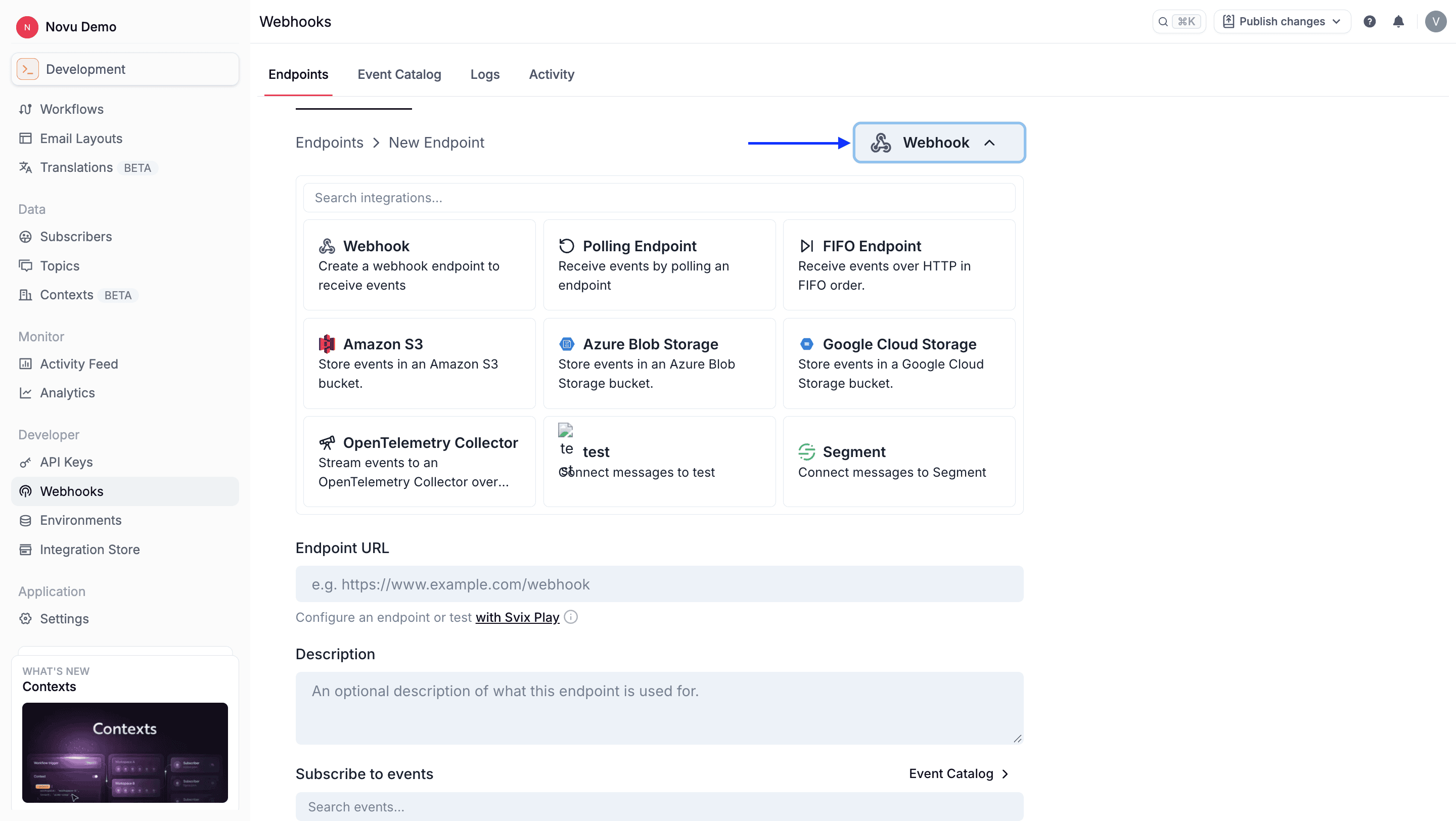
Open Webhooks in the dashboard
Go to the Webhooks page in the Novu dashboard.
Configure connection settings
Configure the connector-specific connection settings described in the sections below.
Define table schema and transformation (data warehouses)
For data warehouse connectors (ClickHouse, Snowflake, Redshift): define the table schema and write a transformation that maps Novu webhook payloads to rows matching that schema. See Data warehouse connectors.
Customize transformation (message connectors)
For message connectors (Amazon SQS, Amazon SNS): review and customize the transformation that shapes the message body sent to the queue or topic. See Message connectors.
Select event types
Select the event types you want this endpoint to subscribe to.
Available connectors
Novu supports the following webhook connectors:| Connector | Type | Description |
|---|---|---|
| ClickHouse | Data warehouse | Store events in a ClickHouse table. |
| Snowflake | Data warehouse | Store events in a Snowflake table. |
| Amazon Redshift | Data warehouse | Store events in an Amazon Redshift table. |
| Amazon SQS | Message | Send events to an Amazon SQS queue. |
| Amazon SNS | Message | Send events to an Amazon SNS topic. |
Transformations
Every connector endpoint runs a JavaScript transformation before delivery. The transformation converts the raw Novu webhook into the format your destination expects. In the Novu dashboard, configure the transformation when creating or editing a connector endpoint. Each connector type ships with a default template—use it as your starting point.How to write a transformation
Svix expects a function namedhandler. For connector endpoints, the handler receives a webhook object with:
| Property | Description |
|---|---|
webhook.eventType | The Novu event type (for example, message.sent). |
webhook.payload | The webhook JSON body. Shape depends on the event type—see event types. |
webhook.method | HTTP method. Usually "POST". |
webhook.url | Destination URL. Generally leave unchanged for connectors. |
webhook.cancel | Set to true to skip delivery for a given event. Defaults to false. |
webhook object after modifying webhook.payload (and optionally other allowed properties). Test your code in the dashboard against a sample payload before going live.
Handle every event type your endpoint subscribes to. Use
switch (webhook.eventType) or equivalent logic so each event maps to a valid destination record.Data warehouse connectors
Data warehouse connectors (ClickHouse, Snowflake, Redshift, and similar) insert one row per delivered webhook. Credentials and table location alone are not enough—you must also configure:- Table schema — Column names and types that match your destination table.
- Transformation — JavaScript that maps each webhook
eventTypeandpayloadinto a row compatible with that schema.
Recommended setup flow
Create the destination table
Create the destination table in your warehouse with columns for the fields you want to store (for example,
event_type, message_id, subscriber_id, payload, created_at).Add the connector endpoint
Add the connector endpoint in Novu and fill in connection settings (URL, credentials, database, table name, and so on).
Define the table schema
Define the table schema in the connector configuration so it matches your destination table.
Write the transformation
Write the transformation to map Novu payloads into that schema. Start from the dashboard template and adjust field names and types for your table.
Example transformation
This example maps amessage.sent event into a flat row. Adjust field names to match your table schema and add cases for every event type you subscribe to.
Message connectors
Message connectors (Amazon SQS and Amazon SNS) publish each webhook as a queue message or topic notification. Use the transformation to shape the JSON body your consumers receive. The default template typically forwards the webhook payload. Customize it if downstream workers expect a specific structure (for example, flattening nested fields or adding metadata).ClickHouse
The ClickHouse connector stores Novu webhook events directly in a ClickHouse table. Use it when you want to analyze notification events in ClickHouse without building a custom ingestion pipeline.Configuration
| Field | Required | Description |
|---|---|---|
| URL | Yes | The ClickHouse server URL (for example, https://clickhouse.example.com:8443). |
| Username | Yes | The username used to authenticate with ClickHouse. |
| Password | Yes | The password for the ClickHouse user. |
| Table name | Yes | The name of the table where events are stored. |
| Database | No | The ClickHouse database name. If omitted, the default database is used. |
| Table schema | Yes | Column definitions that match your ClickHouse table. |
| Transformation | Yes | JavaScript that maps webhook payloads to rows matching the table schema. |
Setup
Grant insert permissions
Ensure the configured user has permission to insert rows into the target table.
Snowflake
The Snowflake connector stores Novu webhook events directly in a Snowflake table. Use it when you want notification data available in your Snowflake data warehouse for reporting, analytics, or downstream pipelines.Configuration
| Field | Required | Description |
|---|---|---|
| Account identifier | Yes | Your Snowflake account identifier. |
| User ID | Yes | The Snowflake user used to authenticate. |
| Private key | Yes | The private key for key-pair authentication. |
| Database name | No | The Snowflake database where events are stored. |
| Schema name | No | The schema containing the target table. |
| Table name | No | The table where events are stored. |
| Table schema | Yes | Column definitions that match your Snowflake table. |
| Transformation | Yes | JavaScript that maps webhook payloads to rows matching the table schema. |
Setup
Configure key-pair authentication
Configure a Snowflake user with key-pair authentication and insert permissions on the target table.
Amazon Redshift
The Amazon Redshift connector stores Novu webhook events directly in a Redshift table. Use it when you want notification events available in your Redshift data warehouse for analytics and reporting.Configuration
| Field | Required | Description |
|---|---|---|
| Region | Yes | The AWS region where your Redshift cluster or workgroup is located. |
| Access key ID | Yes | The AWS access key ID with permission to write to Redshift. |
| Secret access key | Yes | The AWS secret access key for the IAM user. |
| Cluster identifier | No | The Redshift cluster identifier. Required for provisioned clusters. |
| Workgroup name | No | The Redshift Serverless workgroup name. Required for serverless deployments. |
| Database user | No | The database user for provisioned clusters. |
| Database name | No | The Redshift database where events are stored. |
| Schema name | No | The schema containing the target table. |
| Table name | No | The table where events are stored. |
| Table schema | Yes | Column definitions that match your Redshift table. |
| Transformation | Yes | JavaScript that maps webhook payloads to rows matching the table schema. |
For provisioned Redshift clusters, set Cluster identifier and Database user. For Redshift Serverless, set Workgroup name instead.
Setup
Amazon SQS
The Amazon SQS connector sends Novu webhook events to an Amazon SQS queue. Use it when you want to process notification events asynchronously through your existing AWS messaging infrastructure.Configuration
| Field | Required | Description |
|---|---|---|
| Queue URL | Yes | The URL of the target SQS queue. |
| Region | Yes | The AWS region where the queue is located. |
| Access key ID | Yes | The AWS access key ID with permission to send messages to the queue. |
| Secret access key | Yes | The AWS secret access key for the IAM user. |
| Endpoint URL | No | A custom endpoint URL. Use this when connecting to LocalStack or other SQS-compatible services. |
| Transformation | Yes | JavaScript that shapes the message body sent to the queue. |
Setup
Amazon SNS
The Amazon SNS connector publishes Novu webhook events to an Amazon SNS topic. Use it when you want to fan out notification events to multiple subscribers through SNS.Configuration
| Field | Required | Description |
|---|---|---|
| Topic ARN | Yes | The ARN of the target SNS topic. |
| Region | Yes | The AWS region where the topic is located. |
| Access key ID | Yes | The AWS access key ID with permission to publish to the topic. |
| Secret access key | Yes | The AWS secret access key for the IAM user. |
| Endpoint URL | No | A custom endpoint URL. Use this when connecting to LocalStack or other SNS-compatible services. |
| Transformation | Yes | JavaScript that shapes the notification body published to the topic. |
Setup
Monitoring and troubleshooting
Connector endpoints support the same delivery monitoring, retry, and recovery features as standard webhook endpoints. From the endpoint details page in the Novu dashboard, you can:- View delivery attempts and failure reasons in the Logs tab.
- Inspect the transformed payload sent to your destination.
- Resend individual failed events.
- Recover or replay failed messages from a selected time window.
| Symptom | What to check |
|---|---|
| Authentication errors | Connector credentials, IAM permissions, or database user grants. |
| Schema or type errors | Table schema matches your destination table; transformation output uses the correct column names and types. |
| Missing rows or messages | Delivery shows success in Logs but destination is empty—transformation may not match the expected insert or message format. |
| Unhandled event types | Transformation includes a branch for every subscribed event type. |